

Your cookie consent banner was quietly deactivated three days ago, and you’re only finding out now. Do you know which user made the change, or when it happened?
For WordPress sites that handle personal data, activity logging plays an important role in supporting privacy compliance and accountability.
In this article, we’ll cover why activity logging is critical for compliance and how to implement it in WordPress.
Why Activity Logging Is Critical for Privacy Compliance
Activity logging creates a structured, time-stamped record of what has happened on your WordPress site: who did what, and when.
Without it, you’re essentially operating blind. If a user changes permissions, deletes content, or modifies a setting that affects how personal data is collected or processed, you need a clear record of that action to investigate or account for it later.
A well-configured activity log typically records events such as:
- User logins and failed login attempts
- Content creation or modification
- Changes to user roles or permissions
- Plugin installations, updates, or removals
- Configuration or settings changes
This level of visibility helps administrators and compliance experts with audits, ensuring ongoing compliance by identifying suspicious behavior and investigating unauthorized access attempts.
Let’s look at practical scenarios where activity logs support privacy compliance.
#1 Improve accountability and transparency
The accountability principle in the GDPR (Article 5(2)) requires data controllers to demonstrate compliance with the core data protection principles set out in Article 5(1), such as lawfulness, data minimization, and purpose limitation.
A comprehensive activity log can help document actions taken on the website and may support evidence-gathering for compliance processes.
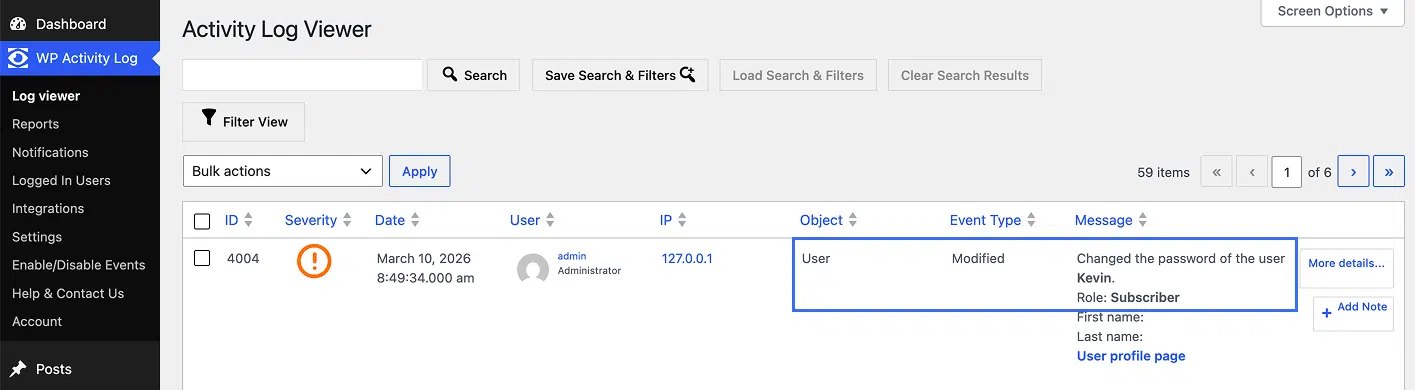
For example, if an administrator resets a user’s password, the activity log records who initiated the reset and when it occurred.
This allows the team to verify that account access changes were legitimate and properly authorized, rather than the result of unauthorized access.
See an example in the screenshot below.
#2 Detect risky or accidental changes
WordPress websites constantly evolve. Content is updated, plugins are configured, and multiple users adjust settings.
These changes can sometimes compromise privacy controls without anyone noticing.
Activity logging allows administrators to review when unauthorized or accidental changes occurred, helping ensure that security or privacy controls remain intact.
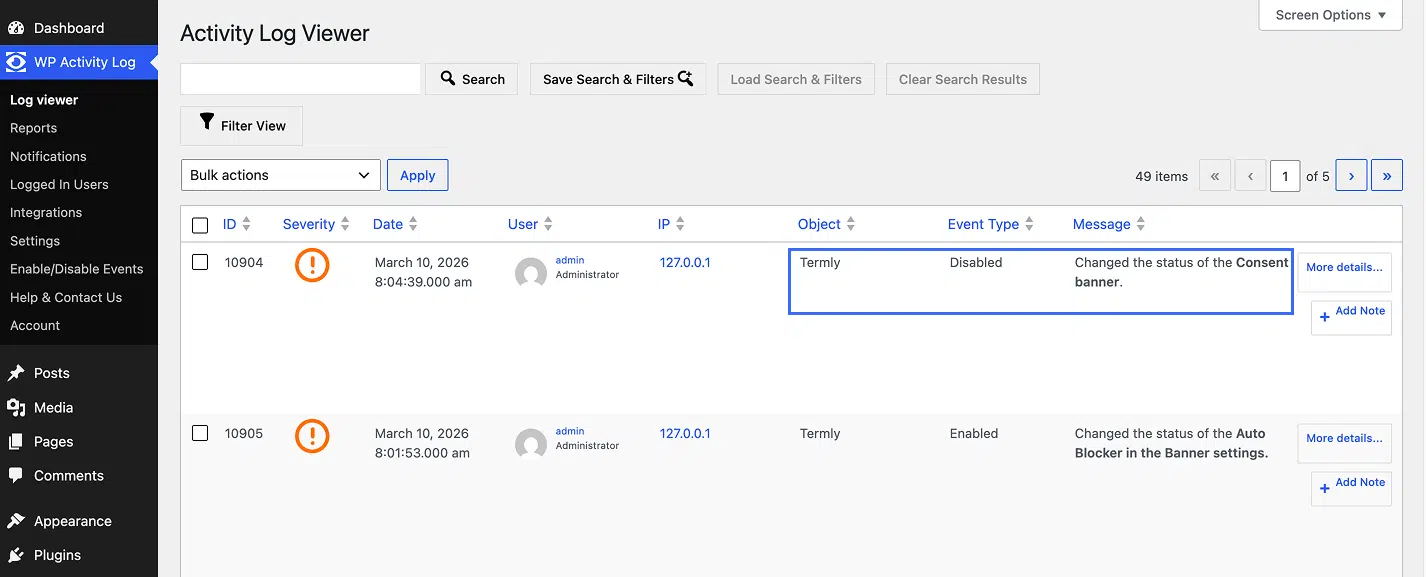
For example, a user could accidentally deactivate your site’s cookie consent banner.
With activity logging enabled, administrators can be notified immediately when that kind of change occurs, and restore the correct configuration before the site operates out of compliance.
For example, see the screenshot below.
#3 Investigate incidents faster
Activity logs provide a chronological record of many WordPress events leading up to and during an incident, making investigations significantly easier.
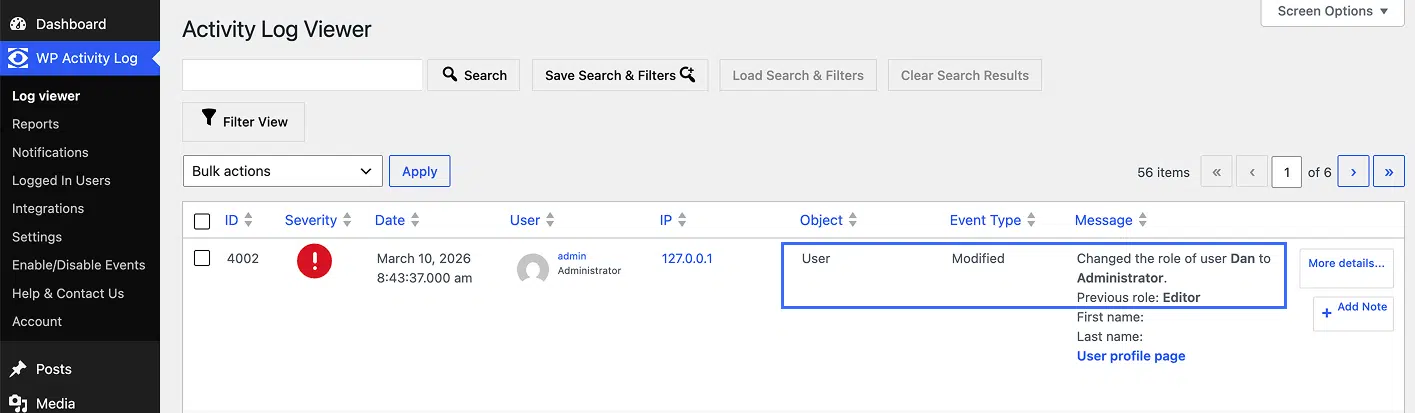
If an administrator receives an alert that a low-privilege user was unexpectedly escalated to the Administrator role, the activity log makes it straightforward to check when that change was made and by whom.
This allows the team to assess whether the action was legitimate or part of a security incident that requires further response.
See an example in the screenshot below.
There’s a separate layer of logging that’s equally important: proving that your visitors gave valid consent before their data was collected.
GDPR Article 7(1) requires that where processing is based on consent, the controller must be able to demonstrate that the data subject consented.
In practice, this means retaining a verifiable consent log: proof of who consented, when, and to what.
Consent logs are typically handled by a consent management platform.
They capture when and how a user gave or withdrew consent, what they agreed to, and which version of the banner or preference tool was shown to them.
Termly Pro+ plan members can access detailed user consent logs directly from the Consent Logs section of the Termly dashboard and export them when needed.
Together, activity and consent logs support different aspects of compliance.
Activity logs provide visibility into user and system activity on the site, while consent logs provide evidence that user consent was obtained.
How to Implement Activity Logging (WordPress)
The web runs largely on content management systems, with WordPress alone powering over 42.5% of all websites.
While most CMS platforms lack a built-in, user-friendly activity logging system suitable for auditing, WordPress is one of the easiest to extend, and getting started is straightforward and can be done in a few minutes.
We’ll use WP Activity Log, one of the most widely used solutions in the WordPress repository, with over 300,000 active installations and, importantly, one that supports Termly.
To get started:
- Navigate to Plugins > Add New Plugin in your WordPress dashboard.
- Search for WP Activity Log, then click Install Now and Activate.
- The setup wizard will walk you through the initial configuration, prompting you to add a login page notice that informs users their activity is being monitored.
You can watch a short video highlighting these steps below.
Once set up, the plugin begins logging immediately.
You can review activity at any time by navigating to WP Activity Log > Activity Log, and adjust settings under WP Activity Log > Settings.
Events that WP Activity Log tracks
Every WP Activity Log event includes the date and time, the user and their role, and the source IP address, giving you the context needed for compliance investigations.
From a privacy compliance perspective, the most relevant events include:
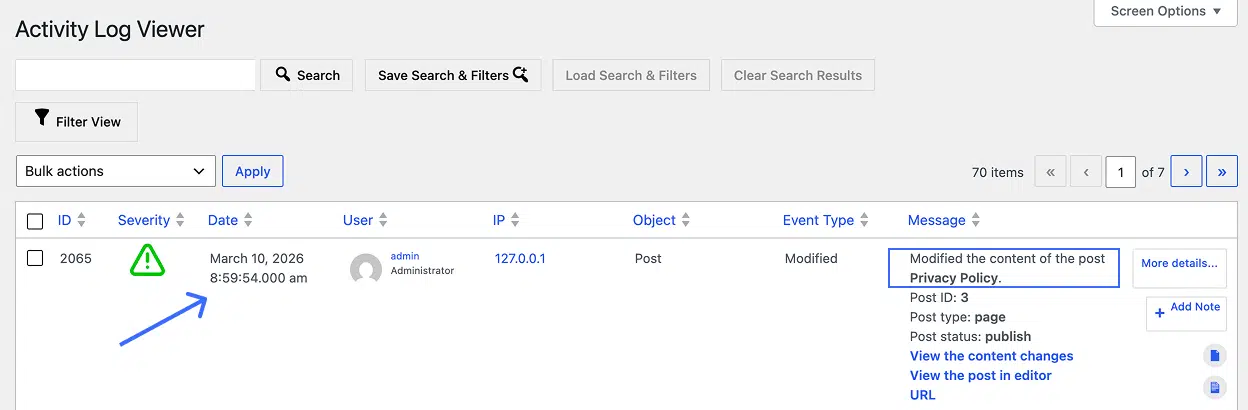
- Post and page changes, including Privacy Policy and Terms & Conditions edits
- Plugin activations and deactivations,
- WordPress core and site-wide configuration changes
- User role and permission changes, including Administrator account modifications
See an example in the screenshot below.
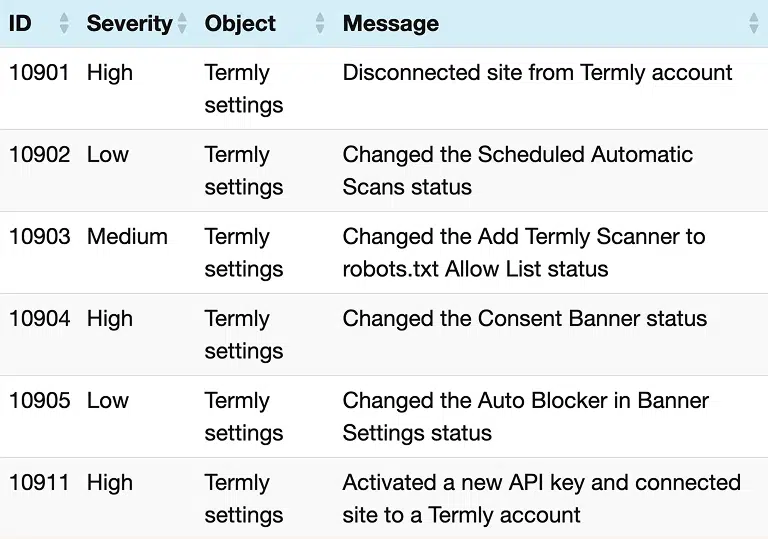
WP Activity Log also tracks Termly-specific events directly, which is particularly useful for teams using Termly as their consent management platform.
These include:
- Connecting or disconnecting the site from a Termly account
- Changes to the Consent Banner status
- Changes to Auto Blocker settings in Banner configuration
- Changes to the Scheduled Automatic Scans status
- Changes to the Termly Scanner robots.txt Allow List status
See this in detail in the screenshot below.
For a full list of tracked events, you can check the WP Activity Log event IDs documentation.
Advanced features in the premium edition
The free edition of WP Activity Log provides broad coverage of user and system activity.
Still, for organizations with higher privacy compliance requirements, the premium and enterprise editions add several useful features:
- Instant SMS, email & Slack alerts: get notified of critical events, such as a user role being elevated to Administrator or configuration changes that may affect access to personal data.
- Advanced search and filters: quickly find the specific events relevant to a regulatory inquiry or security investigation without manually scrolling through thousands of log entries.
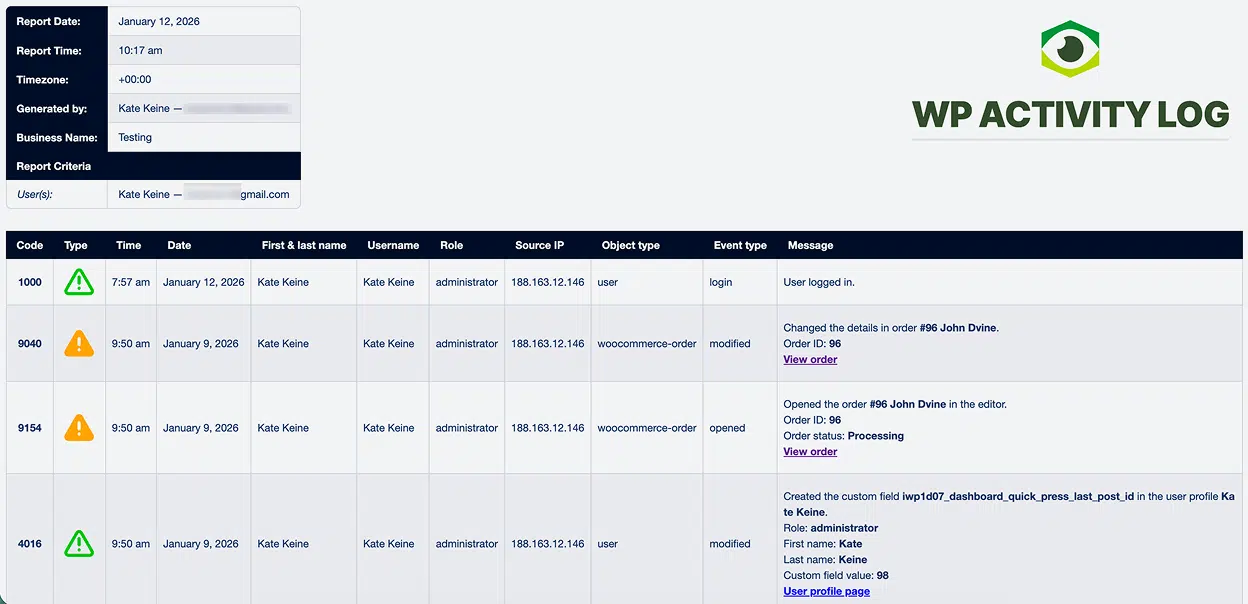
- Generate & schedule activity log reports: create fully configurable user and system reports and schedule them daily, weekly, monthly, or quarterly.
- External log storage: mirror your activity logs to an external database or log management system such as AWS CloudWatch, Papertrail, or Loggly.
- Log archiving: move older log data to a separate database to keep the active log lean without losing your compliance history.
Check out an example in the screenshot below.
Best Practices for Maintaining Privacy Compliance with Activity Logs
Activity logging is most effective when it is actively monitored and integrated into broader privacy governance and security practices, rather than treated as a passive record.
To ensure logs provide meaningful oversight, focus on the following practices:
- Disclose logging in your Privacy Policy: regulations such as the GDPR require transparency about how personal data is processed. If activity logs contain personal data, their use should be disclosed in your privacy notice and managed in accordance with the appropriate legal bases and retention policies.
- Set a log retention policy: The GDPR’s storage limitation principle requires that personal data be retained only as necessary. Apply the same thinking to your logs. Define a retention period that meets your compliance needs, and configure WP Activity Log’s retention settings accordingly.
- Protect log integrity: storing logs in a separate system or external database helps reduce the risk of attackers modifying or deleting records if the site is compromised. Preserving reliable logs is particularly important if they may be needed during an investigation or compliance audit.
- Have a breach response process ready: GDPR requires data breaches to be assessed and, where necessary, reported. Knowing in advance how your team will use log data during an incident lets you act quickly when it matters.
- Monitor logs proactively: configure alerts for critical events and regularly review activity logs. Periodic checks alongside your broader privacy and consent management practices help detect issues early, before a configuration change or permission update creates a compliance risk.
Activity logging strengthens the security and accountability of your WordPress site by documenting actions that may affect personal data and site configuration.

Written by Natasha Piirainen
Natasha Piirainen is a privacy writer with a Bachelor’s Degree in English and Philosophy from Wheaton College and over 10 years of professional experience in research-driven content development.
Read all posts by Natasha Piirainen
Reviewed by Masha Komnenic CIPP/E, CIPM, CIPT, FIP
Masha Komnenic is a legal counsel and Termly’s Director of Global Privacy, who received her law degree from Belgrade University. She specializes in implementing, monitoring, and auditing business compliance with privacy regulations (HIPAA, PIPEDA, ePrivacy Directive, GDPR, CCPA, POPIA, LGPD).
Read all posts reviewed by Masha Komnenic CIPP/E, CIPM, CIPT, FIP