

Want a data privacy and consent management solution for your business? I compared Termly versus Didomi to help you choose the one that fits your needs.
Termly vs Didomi: Quick Comparison
The table below quickly compares Didomi versus Termly.
Termly |
Didomi |
|
Free Services |
Termly offers a FREE plan that includes:
|
Didomi does not offer a free plan. |
Paid Services |
Monthly + Annual Billing Available for 3 Plans.
|
Didomi’s pricing is not available publicly; you must reach out directly for a quote. |
Policy Generators |
Termly offers 10 legal policy generators:
|
Didomi’s website does not advertise any policy generators. |
Consent Management |
Termly’s CMP offers:
|
Didomi’s CMP offers:
|
Privacy Law Compliance |
Privacy Policy Generator & Template:
Consent Management Platform:
|
Didomi’s website states that they support laws like the GDPR, CCPA/CPRA, VCDPA, and various jurisdictions across the globe. |
Customer Support |
Support Options
|
Support Options
|
Agency/Partnership Plans |
Custom Agency Plan includes:
|
Didomi does not appear to offer an Agency PlanThey have a partner program that may allow certified marketing partners to use Didomi consent management platform for free on their website. |
Customer Reviews + Business Accolades |
|
|
Deeper Dive Into Features and Solutions
Let’s compare the different features and solutions offered by Termly and Didomi.
How Do Termly Free Services Compare To Didomi?
Only Termly offers free services. Didomi does not have a free plan or free trial.
What Does Termly Offer Free Users?
Termly has a free plan that users can access by creating an account.
With this free plan, users can access to any one policy generator plus a basic version of Termly’s consent management platform (CMP).
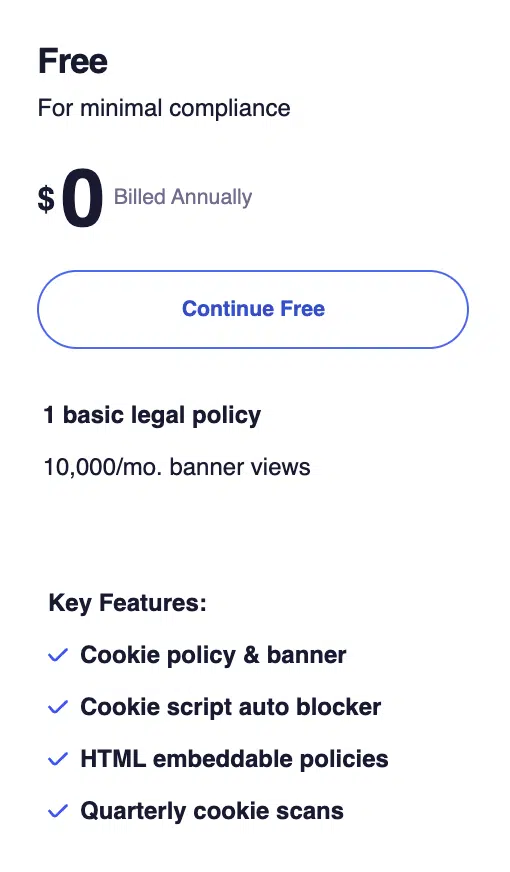
The consent features include the use of the website scanner and cookie policy generator, plus the following:
- Access to any 1 of the policy generators
- Cookie policy generator
- Cookie banner
- Cookie script auto-blocker
- HTML embeddable policies
- Quarterly cookie scans
- FREE DSAR form
There is also a free Termly CDPR/CCPA Cookie Consent Banner plugin for WordPress available to use.
Plus, Termly has free template versions of each generator that anyone can use, which all have comparable legal considerations and clauses to the Generators.
Comparing Termly vs Didomi Paid Services
Both Termly and Didomi have paid plans available for businesses to choose from.
Termly’s pricing is transparently available on their website, but with Didomi, no pricing is made public. You must contact them to request a quote.
What Paid Plans Does Termly Offer?
Termly allows businesses to select from three available pricing plans:
- Starter Plan: $14/month when billed monthly, $10/month when billed annually
- Pro+ Plan: $20/month when billed monthly, $15/month when billed annually
- Agency: Custom
The Starter Plan gives you access to two policy generators, the Consent Management Platform, the cookie policy generator, and up to 50,000 page views per month.
The Pro+ Plan unlocks all policy generators and the full CMP, which features unlimited banner views and the following benefits:
- Multi-language supports
- Weekly cookie scans
- Auto-updated policies
- Remove the Termly logo
- IAB TCF v2.2 compatibility
- Google Consent Mode v2 compatibility
- Regional consent rules
- Scan subdomains
- Consent logs
- Multi-user permissions
Termly also has an Agency Plan for resellers and anyone managing multiple websites.
It includes all features from the Pro+ plan, plus the following:
- Additional bulk pricing discounts
- Multi-domain management
- Multi-user permissions
- Custom marketing materials
- Training & onboarding
- Compliance support
- Bulk import
- And more!
To learn more, view Termly’s Pricing Page.
What Paid Plans Does Didomi Offer?
For information about Didomi’s paid plans, users must contact them and request a quote.
Comparing Termly’s Policy Generators to Didomi
Termly offers policy generators that businesses can use to create required policies and agreements such as privacy policy, terms of service, cookie policy, and return policy.
Didomi, on the other hand, does not provide a policy generator tool as it is a consent management platform geared towards enterprise businesses.
At this time, Termly offers 10 different generators, which are also available as free templates. You can see them all in the table below:
Comparing Termly’s Consent Management to Didomis
Both Termly and Didomi offer consent management solutions that are useful for various types of businesses.
Termly’s consent management tools are highly rated and provide features and benefits such as:
- Cookie policy
- Cookie banner
- Script auto blocker
- HTML embeddable policies
- Weekly cookie scans
- Privacy regulation monitoring
- Remove Termly logo
- Custom banner styles
- Multi-language support
- Regional consumer rules
- Auto-updated policies
- Multi-user permissions
- Consent log
- DSAR form
- Google Consent Mode v2 compatibility
- IAB TCF v2.2 compatibility
- Can support Microsoft UET Consent Mode
- Google CMP Partner with Gold status
- Google Tag Manager
- User consent preference center
- Plugin for WordPress available
It’s known for having a simple setup and installation process. Termly also regularly updates and adds to their offerings, which provides a continuous value to their users.
Didomi’s consent management platform includes features such as:
- Cookie banner
- Custom banner styles
- Regional consent rules
- Consent proofs/history
- Cross-domain consent sync
- A/B banner testing
- Vendor/tracker scanning
- Preference management tools
- Analytics export options
- IAB TCF Google Consent Mode v2
- Headless privacy widgets
- API integration support
- Consent analytics dashboard
- And more.
They target enterprise level businesses and global brands, so their CMP is scaled to match.
What Privacy Law Compliance Does Termly Offer vs Didomi?
Both Termly and Didomi policy offer tools that help businesses align with several privacy laws from around the world.
Termly’s CMP, for example, is configurable to meet guidelines in over 80 regions, and the Privacy Policy Generator currently covers 30 privacy laws.
Termly’s legal team and product engineers update the generator regularly to help keep up with the constantly evolving data privacy legal landscape.
You can learn more in the ‘What laws does Termly cover’ resource article.
Didomi also covers major global laws, and their website mentions their solutions support frameworks such as the GDPR, the CCPA/CPRA, the VCDPA, and additional jurisdictions across the globe.
What Customer Support Does Termly Offer vs Didomi?
Termly and Didomi both offer multiple convenient customer support channels for users.
Termly’s customer support team is highly rated. Available avenues to request help include:
- A live chat
- A working phone line available from Monday to Friday, 9 AM – 6 PM EST.
- A contact form on their site, which leads to a support email, and
- Support articles and other content on the website.
Didomi offers similar support options to Termly, including availability by phone, email, and live chat. There’s also a form, support articles, and documentation available on the website.
What Are Termly’s Customer Reviews + Business Accolades Compared to Didomi?
Termly is well-rated by customers on sites like Trustpilot.
- Termly earned a 4.7 ‘excellent’ on Trustpilot based on 558 reviews
- Didomi does not appear to have any ratings on Trustpilot
However, Didomi is rated on G2 and earned 4.5/5 based on 159 reviews. Termly received 4.3/5 on G2 based on 38 reviews.
Based on these comments, Termly’s customers are incredibly satisfied with their services. They love using Termly, saying it saved them time, reassured them, and helped clear up confusion.
Several users say they especially appreciate the personalized, quick, and knowledgeable customer support team.
Of the online reviews that exist for Didomi, users mention liking how easy the product is to use, and how responsive the customer support team is.
They say the interface is intuitive, and the features help with compliance efforts.
Does Termly or Didomi Offer Additional Features?
Termly and Didomi both have additional features that are useful for different kinds of businesses.
For example, Termly’s multiple policy generators help businesses easily make custom legal policies that most businesses require, like terms and conditions agreements, EULAs, and return and shipping policies.
This saves you a lot of time and effort. It’s super easy for businesses to update these policies from a single convenient location, the Termly dashboard.
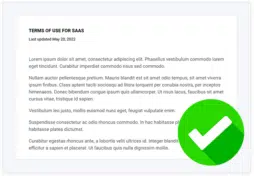
The generators even have expert-written tips and answers to frequently asked questions. Check out an example of one in the screenshot below.
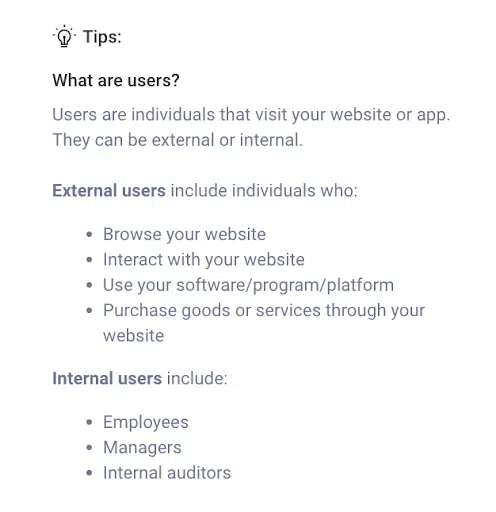
These tips help simplify the complex process of legal compliance, making it easier to ensure accuracy and when completing these essential legal documents.
Didomi has additional features like CTV-specific consent, so they can support connecting to TV devices such as Apple TV, Android TV, and others.
They also offer things like deep integrations, cross-device consent management, and extensive API support.
Does Termly or Didomi Have a Plan for Agencies/Partnerships?
Termly offers a customized agency/partnership/reseller program that is ideal for resellers, agencies, and those with multiple websites.
It features everything in the Pro+ as well as additional benefits, including:
- Bulk pricing discounts
- Multi-domain management
- Multi-user permissions
- Customized marketing materials
- Training and onboarding support
- Compliance support
- Bulk importing, and more!
To learn more, check out Termly’s Agency Page.
Unlike Termly, Didomi does not appear to have an agency or partner plan.
However, it has a “Didomi Partner Program” that may allow certain certified partners to access and use the consent management platform on their website for free.
Which One Is Right for You?
Both Didomi and Termly offer consent management solutions that can help businesses align with applicable privacy laws that impact businesses, and they each have unique features.
The addition of Termly’s 10 policy generators is convenient for those requiring legal policies that need to remain regularly updated.
But when it comes to determining who is the right privacy compliance partner for your business, the choice yours!
FAQs: Termly vs Didomi
Read through some answers to frequently asked questions below.
To pick the right consent management platform and data privacy solution for your business, follow these simple tips:How do you choose consent management and data privacy tools for your business?
- Know what laws your business is subject to following,
- Know what data you business collects (or wants to collect) from users,
- Look for a solution that aligns with all applicable laws you must follow,
- Compare customer reviews to ensure the platform is easy to install and maintain,
- Seek out solutions that are legally backed and created by privacy professionals,
- Choose a solution that constantly evolves and can grow with you.
Does my business need data privacy and consent management tools?
Yes, most businesses need some kind of data privacy and consent management solution, especially if you deploy internet cookies, process personal information, or fall under any privacy laws.
DISCLAIMER: The information in this article represents the details that were available on Termly and Didomi websites as of March 27, 2026. Both Termly and Didomi product offerings, details, and information are subject to change at any time. This article is for informational purposes only and does not claim to be a significant representation of Didomi or Termly.

Written by Ali Talip Pınarbaşı, CIPP/E, & LLM
Ali is a London-based Data Privacy Law Solicitor with a Master of Laws Degree in EU Privacy law at King's College London. He has six years of experience in advising businesses on how to comply with data protection laws.
Read all posts by Ali Talip Pınarbaşı, CIPP/E, & LLM
Reviewed by Masha Komnenic CIPP/E, CIPM, CIPT, FIP
Masha Komnenic is a legal counsel and Termly’s Director of Global Privacy, who received her law degree from Belgrade University. She specializes in implementing, monitoring, and auditing business compliance with privacy regulations (HIPAA, PIPEDA, ePrivacy Directive, GDPR, CCPA, POPIA, LGPD).
Read all posts reviewed by Masha Komnenic CIPP/E, CIPM, CIPT, FIP