


If your website uses cookies, you may need to display a cookie notice explaining what data you collect, why, and how your users can manage their preferences.
Understanding the rules and setting up a cookie notice can feel confusing, especially if you’re new to privacy compliance.
Below, learn what a cookie notice is and how to create one for your website.
Key Takeaways
- A cookie notice informs website visitors about cookies yours site uses and why.
- To make one, use tools like Termly’s consent management platform.
- Many privacy laws require a cookie notice based on your users and data use.
- Your notice should explain cookies clearly and offer easy consent controls.
What Is a Cookie Notice?
A cookie notice is a message that informs users that your website uses cookies to collect data and perform other functions and typically explains:
- What types of cookies you use
- Why you use them
- How your users can manage their preferences
They’re usually presented as a banner, pop-up, or overlay when someone first visits a website and help websites align with privacy laws like the GDPR, the CCPA, and the CIPA.
How Can I Create a Cookie Notice?
To create a cookie notice, you can try the following methods, all of which I cover below:
- Use a fully managed tool: Easiest option, quickest, typically comes with a monthly or annual fee, but streamlines cookie consent notice creation and management.
- Install a plugin: Also a simple option, quick, sometimes free with more advanced features coming with a monthly or annual fee. Simplifies compliance efficiently.
- Start from a template: Requires more manual work but completes the formatting for you. Templates should always be free.
- Try to build your own from scratch: Difficult, time consuming, and may still be costly. Requires knowledge about privacy laws, coding, and other technical skills.
Why and How To Use a Managed Solution to Create a Cookie Consent Notice
Using a managed solution to create a cookie consent notice is the easiest way to create and maintain a cookie notice, manage user preferences, and keep your website’s data practices transparent.
These tools guide you through setup and help manage user consent consistently over time.
For example, to use Termly’s Consent Management Platform, follow these easy steps:
- Scan your site to locate and categorize all cookies,
- Review and build your custom cookie consent notice,
- Select from various cookie banner styles and configurations,
- Select applicable consent settings based on your plan and needs,
- Publish your consent policies and add your cookie consent notice directly to your website!
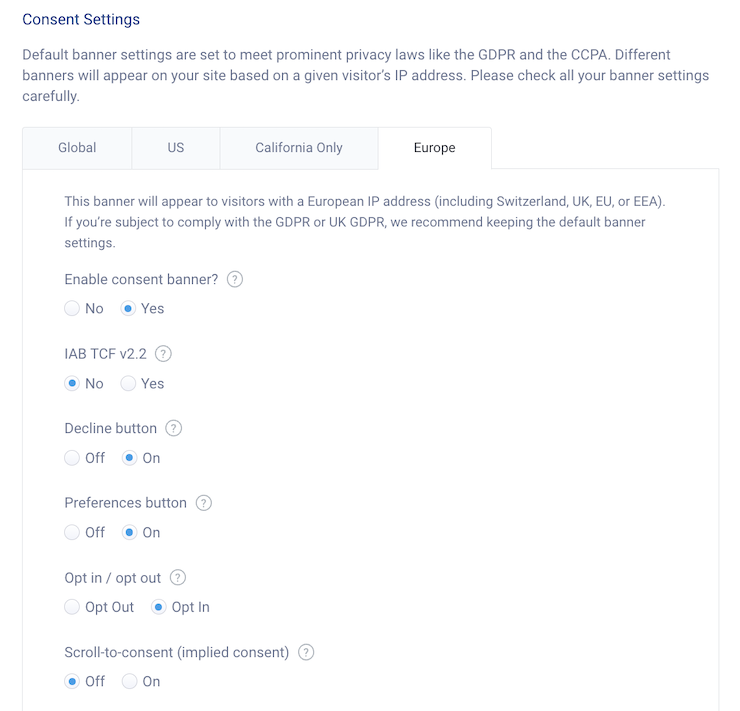
You can see an example of European consent notice settings in the screenshot below.
With top of the line solutions like Termly, you can even:
- Scan your website for cookies,
- Categorize the cookies,
- Automatically block certain cookies and tracking technologies based on user preferences.
Our Consent Management Platform also generates a customizable cookie banner, preference center, and cookie policy, and you get a free embeddable DSAR form.
Our legal team and privacy experts update and maintain it regularly, making it easier for you to work toward compliance.
Why and How To Use Plugins to Create a Cookie Consent Notice
You can also create a cookie consent notice by using a Plugin, which is another easy solution, especially if you have a website built on platforms like WordPress.
These tools typically integrate directly into your site and help you add a cookie banner without much manual setup.
For example, Termly offers a GDPR/CCPA Cookie Consent Banner plugin for WordPress that’s designed to help businesses comply with global data privacy laws like the GDPR, the CCPA, the ePrivacy Directive, U.S. state-level laws, and more.

To use Termly’s WordPress plugin, follow these simple steps:
- Input your website URL so it can be scanned for cookies,
- Create your customizable cookie consent banner,
- Choose your consent settings, like auto-blocking tracking technologies based on user preferences,
- Publish your final cookie consent notice to your website.
It’s a user-friendly option for managing consent, all while helping your site stay aligned with major privacy regulations.
Why and How To Use a Template to Create a Cookie Consent Notice
You can also use a free template to create a cookie consent notice, although this will take more time and effort on your part.
Using a template is a good option if you want more control over your cookie notice without building one entirely from scratch.
A cookie policy template can help you create a document that outlines what types of cookies you use, why you use them, and how users can manage their preferences.
For example, Termly offers a free cookie policy template that makes it easy to customize a policy for your site.
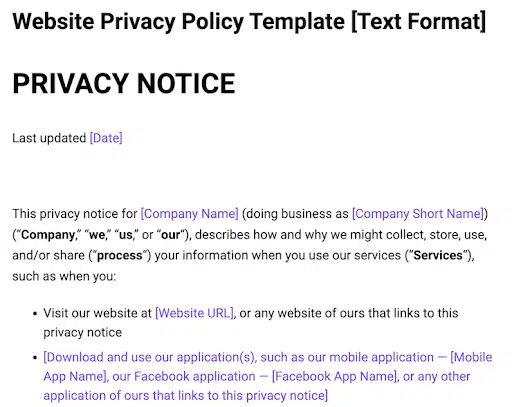
You can adapt it to match your cookie practices and create a cookie consent notice in the following ways:
- Fill in all blank sections with accurate details about your business,
- Add or remove information as necessary based on your unique needs,
- Create a consent banner for your site that adapts to users based on applicable laws,
- Review your final cookie notice and publish it to your site!
Linking your cookie policy through your cookie banner helps create a complete and effective cookie notice.
Plus, using a free template helps jumpstart a lot of the hard work for you, saving you time.
Why and How To Make Your Own Cookie Consent Notice from Scratch
Finally, you can also make a cookie notice from scratch if you want complete control over the language and design.
This approach lets you tailor every detail to your website, but it requires a strong understanding of privacy requirements and best practices.
If you choose this route, make sure your notice is clear, transparent, and gives users real choices about how you collect and handle their data.
Here’s some examples of what you’ll need to do:
- Understand and follow all privacy laws that impact your website and your visitors,
- Find and categorize all cookies and trackers your website uses, label them and present them in a policy to users,
- Build a technically sound consent banner configured to collect and process consent from website visitors in a legally compliant manner,
- Provide users with multiple ways to submit requests to follow through on their privacy rights.
- Maintain secure logs of user consent, and enable then to change their minds easily and withdraw or give consent at any time.
Creating your own cookie consent notice is complex and not always recommended because this process requires so much technical work and ongoing maintenance, and data privacy and internet laws are constantly evolving.
Do You Need a Cookie Consent Notice?
If your website uses cookies, then yes, you should have a cookie consent notice.
Many privacy laws, like the GDPR, the CCPA, and others, require websites to display a cookie notice when collecting personal data.
Whether you need one depends on if these laws apply, the types of cookies you use, and where your users are located.
Laws That Impact Cookie Notices
Several data privacy laws outline specific rules for how websites must handle cookies and user consent.
- General Data Protection Regulation (GDPR): Applies to businesses collecting or processing data from users in the European Economic Area (EEA). Requires explicit, opt-in consent before setting non-essential cookies. Consent should be as easy to withdraw as it is to give.
- ePrivacy Directive (EU Cookie Law): Applies to businesses targeting users in the EEA. Requires user consent before storing or accessing cookies. Complements GDPR by focusing on online communications.
- California Consumer Privacy Act (CCPA) & California Privacy Rights Act (CPRA): Apply to businesses collecting personal information from California residents. Require disclosure of cookie use and the option to opt out of selling or sharing data. Focus on transparency and user choice.
- Personal Information Protection and Electronic Documents Act (PIPEDA): Applies to businesses engaged in commercial activities in Canada, regardless of where the business is based. Requires consent before handling personal information, which also applies to data collected through cookies.
- Brazil’s General Data Protection Law (Lei Geral de Proteção de Dados or LGPD):Applies to businesses processing personal data from users in Brazil. Requires notice and a legal basis (often consent) for cookie use. Consent must be freely given, informed, and specific.
- Other U.S. State-Level Privacy Laws (US Data Privacy Law Tracker): Includes Virginia (VCDPA), Colorado (CPA), Connecticut (CTDPA), Utah (UCPA), and several others. Applies to businesses handling personal data of state residents. Requires transparency about cookie practices. Most require opt-in consent for collecting sensitive data, and all require an option to opt out of cookies.
While specific obligations vary by region, the underlying principle is the same: users must be clearly informed about how cookies are used and offered real choices about their data.
What Are The Most Common Cookie Notice Requirements?
To align with major privacy laws, your cookie notice should meet the following requirements.
Clearly Inform Users About Cookies Your Website Uses
Laws like the GDPR, the ePrivacy Directive, and the LGPD require you to provide detailed information about the cookies you use — including their types, purposes, and any data sharing.
This is commonly done by linking to a cookie policy from within your cookie banner.
Obtain Adequate User Consent When Necessary
Laws like the GDPR require explicit opt-in consent before storing non-essential cookies.
Allow Users to Easily Withdraw Consent Anytime
Major laws like the GDPR, the ePrivacy Directive, PIPEDA, and the LGPD require a straightforward process for consent withdrawal.
Maintain Records of Consent Where Required
The GDPR and the LGPD explicitly require businesses to document user consent, and PIPEDA encourages it as part of broader accountability.
Following these requirements will help ensure that your cookie notice is legally sound and user-friendly.
Additionally, some laws require you to maintain records of consent, which can support your compliance efforts if questions arise.
Cookie Consent Notice Examples
Below are two real cookie consent notice examples to help inspire you as you make your own.
Five Guys’ Approach to Cookie Consent Notices
In our first example, you can see how Five Guys uses a clean, prominent cookie banner that appears at the top of the page and immediately captures user attention.
The design shown in the screenshot below darkens the rest of the site until a selection is made, encouraging interaction.

This banner prioritizes user control by leading with “Manage Cookie Preferences” and “Reject All” options before “Accept All Cookies,” supporting informed and balanced consent.
The notice also explains why cookies are used and provides a link to the privacy policy for more detailed information.
It’s a strong example of combining visibility, clarity, and compliance in a user-friendly format.
Nestlé’s Cookie Consent Notice Experience for Website Visitors
Next, let’s consider Nestlé’s cookie consent notice as an example. When you first visit their website, a strong pop-up cookie consent notice appears.
Similar to the previous example, Nestlé’s pop-up requires visitors to interact with it before browsing the page, either by managing settings, rejecting all, or accepting all cookies, as shown in the screenshot below.
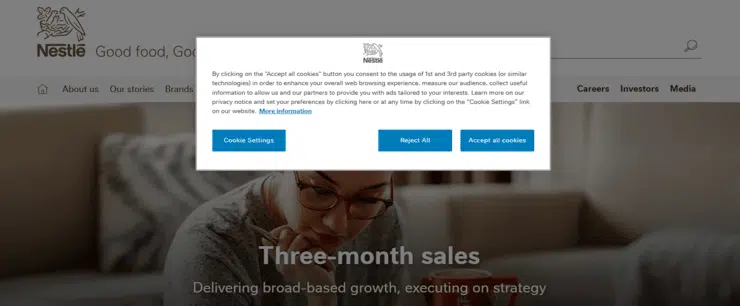
The design draws attention by centering the notice while the content clearly explains why cookies are used and directly links to more information.
These examples show how thoughtful design and clear language can significantly impact compliance and user experience.
To explore more real-world cookie notices, check out our article on consent banner examples.
How Termly Helps Businesses Make Cookie Consent Notices
Managing user consent can feel overwhelming, but Termly’s Consent Management Platform helps simplify the process of making a cookie notice for your website.
With our CMP, you can tailor the look and feel of your cookie notice, meet requirements for different regions, and access features like automatic consent logs and Data Subject Access Request (DSAR) forms.
Key features include:
- Cookie scanning and categorization detects trackers and cookies on your site
- Custom cookie banner and preference center to match your site’s design
- Automatic blocking of tracking scripts based on user preferences
- Multi-region support for laws like GDPR, CCPA, LGPD, and more
- Consent logs and DSAR forms to support compliance efforts
- Integration with Google Consent Mode v2 and IAB TCF 2.2 frameworks
- Easy installation with a simple HTML snippet, and little to no coding required
Whether you’re just getting started or need a scalable solution, Termly offers the tools you need to manage user consent effectively.
Ready to streamline your cookie consent process? Start managing cookie consent with Termly today.

Natasha Piirainen is a privacy writer with a Bachelor’s Degree in English and Philosophy from Wheaton College and over 10 years of professional experience in research-driven content development.
Read all posts by Natasha Piirainen
Reviewed by Masha Komnenic CIPP/E, CIPM, CIPT, FIP
Masha Komnenic is a legal counsel and Termly’s Director of Global Privacy, who received her law degree from Belgrade University. She specializes in implementing, monitoring, and auditing business compliance with privacy regulations (HIPAA, PIPEDA, ePrivacy Directive, GDPR, CCPA, POPIA, LGPD).
Read all posts reviewed by Masha Komnenic CIPP/E, CIPM, CIPT, FIP
Add a FREE Cookie Consent Notice