


Complying with the General Data Protection Regulation (GDPR) is essential for websites with users in the European Union.
Below, I break down what GDPR cookie consent means, what the requirements are, and how to implement a compliant solution on your website so you move forward with confidence.
Key Takeaways
- The GDPR and ePrivacy Directive set high standards for valid user consent.
- Consent is required for non-essential cookies that collect personal data, like analytics, ads, or social media tools.
- Consent must be freely given, specific, informed, and unambiguous; no pre-checked boxes or implied consent!
- Essential cookies (like those for security) do not require consent, but the definition of “essential” is very narrow.
- There must be a “Reject All” and an “Accept All” button on the banner.
- Users should also be able to easily adjust their consent choice at any time.
- Businesses must keep detailed consent logs to demonstrate compliance.
- Using a Consent Management Platform (CMP) like Termly simplifies alignment with multiple privacy laws.
- Website owners are responsible for ensuring the tool is configured correctly.
What Is GDPR Cookie Consent?
GDPR cookie consent refers to properly providing users with the option to opt into unnecessary cookies following the strict guidelines outlined in the General Data Protection Regulation.
Under the ePrivacy Directive and the GDPR, the EU’s dual privacy framework, cookies and other tracking technologies that aren’t strictly necessary for the website to function require clear and informed consent from users before being placed on their device.
The rule requiring consent comes from the ePrivacy Directive, while the GDPR defines the high standard that this consent must meet, and it applies to many types of cookies, including those used for analytics, advertising, and social media integrations.
Why Is Consent Required?
Under the ePrivacy Directive, any non-essential cookies require user consent because it gives the most choice and control to the user whose data you’re trying to collect and process.
The GDPR is a consumer-friendly regulation.
Under this legal framework, consent must be:
- Freely given
- Specific
- Informed
- Unambiguous
Do All Cookies Need Consent?
All nonessential cookies need user consent before being placed on their browsers.
Essential cookies, often referred to as “Strictly necessary” cookies, are necessary for your website to function properly from the users’ perspective and do not require user consent.
However, it’s important to note that this exemption is interpreted very narrowly by regulators.
Essential cookies may include:
- Cookies that remember items in a shopping cart
- Session cookies that keep users logged in
- Security cookies that help prevent fraud or protect user data
Non-essential cookies, on the other hand, do require consent. Examples include:
- Analytics cookies that track user behavior (e.g., Google Analytics)
- Advertising cookies that serve personalized ads
- Social media cookies that enable sharing or login through platforms like Facebook
- Functionality cookies that remember user preferences like language or region across visits
It’s important to note that this rule is technology neutral.
It applies not only to cookies but also to other tracking technologies like tracking pixels, unique identifiers, and tracking URLs.
Understanding this distinction is crucial to establishing a compliant consent mechanism.
To learn more about the differences between essential and non-essential cookies, read our guide on the different types of internet cookies.
How Do You Obtain GDPR-Compliant Cookie Consent?
Getting cookie consent under the EU privacy laws like the GDPR isn’t just about showing a banner, but also about giving users real control over how their data is used.
Below are the essential steps to help your business implement a cookie consent experience that’s transparent, respectful, and legally valid.
Step 1: Present a Clear and Prominent Cookie Notice
Under the GDPR, you should present a cookie banner to users as soon as they land on your site, before any non-essential cookies are set.
Make sure it:
- Uses plain, easy-to-understand language
- Clearly states that cookies are used and for what purposes
- Links to your privacy policy or cookie policy with more information about the types of cookies used and why
Under Article 7(2) of the GDPR, consent requests must be presented clearly and be distinguishable from other content.
Hiding or minimizing your banner risks invalidating the user’s consent.
Step 2: Require an Affirmative Action
You must get active, opt-in consent before setting non-essential cookies, which you can achieve by requiring users to take action, for example:
- Clicking an “Accept” button
- Toggling on specific cookie categories
- Choosing preferences through a banner or settings panel
Avoid the following, as they do not meet the standard:
- Pre-checked boxes
- “By using this site, you agree” messages
- Implied consent from browsing behavior
These practices are called out in Recital 32 as invalid, so stick to clear, intentional actions from your users.
Step 3: Provide an Equal Option To Say No
Under the GDPR, consent from users must be freely given, which means they must be able to say no without pressure.
Based on guidance from the European Data Protection Board (EDPB), this means giving users symmetrical choices.
Your banner should include a “Reject All” or “Decline” button that’s just as easy to find and click as “Accept.”
This button must be on the first layer of the banner, not hidden in a secondary menu.
If users feel forced into consenting, or if they can’t access your site unless they agree to cookies (a practice known as a cookie wall, which is generally not allowed), that consent likely isn’t valid. Recital 42 and Article 7(4) warn against these tactics.
Make sure you implement the following on your consent banner:
- “Reject All” is clearly visible and not buried in a settings menu
- You avoid “dark patterns” or deceptive designs, such as making the “Reject” button less prominent through color, contrast, or by using a simple text link instead of a button.
- Users can navigate your site even if they decline cookies (aside from features that truly require them)
Step 4: Offer Granular Controls
Under the GDPR, you must let users choose which categories of cookies they want to allow, which makes consent more specific.
Your banner or Preference Center should include category options like:
- Strictly Necessary (usually toggled on and locked)
- Analytics
- Marketing
- Functional
Add a “Customize Settings” or “Manage Preferences” button to your banner so users can make these choices upfront.
Step 5: Give Users the Full Picture
Consent under the GDPR must also be informed.
Users need to understand what they’re agreeing to, so at a minimum, tell them:
- What data is being collected
- Why it’s being collected
- Who is collecting or receiving it (your business and any third parties)
- How long the cookies last
Present this information briefly in the banner and link to your cookie policy.
Step 6: Keep a Record of Consent
Your business must be able to prove that a user consented.
This is a key requirement under Article 7(1) and part of the “accountability principle” in Article 5(2) of the GDPR.
Use a Consent Management Platform (CMP) or similar tool to:
- Log when and how consent was given (e.g. timestamp and user identifier)
- Track which categories the user agreed to
- Record the version of the banner or policy they saw
Keeping detailed records helps protect your business in case a regulator investigates you.
If you’re ever asked to demonstrate compliance, having a clear audit trail of user consent can help you avoid fines and show that you’re taking privacy seriously.
Step 7: Allow Consent To Be Withdrawn
Under the GDPR, users have the right to change their minds, and withdrawing consent must be as easy as giving it.
This is explained in Article 7(3) of the GDPR.
Here’s how to meet that requirement:
- Add a permanent “Cookie Settings” link or a small persistent icon to your site footer or privacy center so it is always accessible
- Let users revisit their choices and adjust them anytime
- Stop any non-essential cookies immediately when consent is withdrawn
Make this option visible from the start by including a line like:
“You can manage or withdraw your consent at any time by clicking Cookie Settings.”
Failing to offer a straightforward way to withdraw consent not only violates EU privacy requirements but can also damage your credibility with users.
By making it simple to revisit and change cookie settings, you show that your business values transparency and respects user rights.
How Termly Helps Simplify GDPR Cookie Consent
Meeting GDPR cookie consent requirements can feel overwhelming, especially when you’re managing multiple regulations, website scripts, and design limitations.
Termly’s Cookie Consent Manager and Consent Management Platform are built to make the process easier, faster, and legally sound.
What Can Termly Help You Do?
With Termly, you can:
- Scan your site for cookies and trackers
- Categorize cookies automatically by purpose
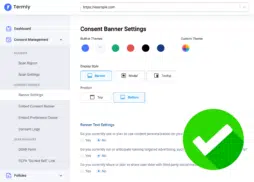
- Generate a customizable cookie banner and preference center
- Block non-essential cookies until consent is obtained
- Display consent prompts in over 10 languages across 25+ regions
- Store consent logs to help prove compliance if needed
- Allow users to manage or withdraw consent at any time
You can also match the look and feel of your banner to your brand with custom fonts, colors, and layout options; no design expertise is required.
Designed With GDPR and Beyond in Mind
Termly’s tools are built to align with the GDPR, ePrivacy Directive, CCPA, and other major privacy laws.
As a Google CMP Partner, Termly also supports IAB TCF 2.2 and Google Consent Mode v2, so you can stay ahead of evolving ad platform requirements, too.
Quick Setup, Little-To-No Coding Required
You can get started in minutes by pasting a single code snippet onto your site!
From there, Termly automatically handles:
- Consent banner display
- Cookie preference storage
- Consent logging and access
- Regular cookie scans and policy updates
No plug-ins or complicated configurations needed.
Try It Free
Termly offers a free plan to help small businesses and website owners start managing consent right away. You’ll get access to:
- Quarterly cookie scans
- 10,000 monthly consent banner views
- A consent preference center
- Cross-domain consent
- A cookie policy generator
- Automatic script blocking
Ready to take the guesswork out of GDPR cookie compliance? Start using Termly’s Cookie Consent Manager or explore the full Consent Management Platform to streamline your efforts today. Hanna De La Garza is a privacy writer at Termly with a Bachelor’s Degree in Journalism from the University of Florida. She creates engaging resources on data privacy, consent management, regulatory updates, and more.
Reviewed by Teodor Stanciu, CIPP/E, CIPM
Teodor Stanciu is a Legal Coordinator & DPO with a Bachelor’s Degree in Law from the University of Bucharest and a Master of Laws in EU and International Business Law from Radboud University.


Ensure Compliance With the GDPR