
Cookie banners are pop ups that appear when a user lands on a webpage informing them about the cookies the site wants to deploy, what they are, and why they’re in use.
Websites that use cookies should also make a cookie banner because they help businesses align with privacy laws and enable users to follow through on their privacy rights.
Using the right cookie banner is imperative and can be the difference between a privacy-literate website and a legal violation.
Key Takeaways
- Websites that use cookies, pixels, or other tracking technologies should have a cookie banner that pops up for new users who land on it page.
- Your cookie banner should include a link to your cookie policy, explain that your site uses cookies, and request users to Accept, Decline, and or access a preference center.
- Make sure your users are also able to easily change their minds at any time after they interact with your cookie banner.
- Your cookie banner should align with all privacy laws that apply to your site and protect your users.
Table of Contents
- What Is a Cookie Banner?
- Do Cookie Banners Help with Compliance?
- Cookie Banner Requirements
- Do Privacy Laws Impact the Text on Cookie Banners?
- General Data Protection Regulation (GDPR) Cookie Text Requirements
- California Consumer Privacy Act (CCPA) Cookie Text Requirements
- Colorado Privacy Act (CPA) Cookie Text Requirements
- Connecticut Data Privacy Act (CTDPA) Cookie Text Requirements
- Virginia Consumer Data Protection Act (VCDPA) Cookie Text Requirements
- Does My Website Need a Cookie Banner?
- Are There Different Types of Cookie Banners?
- How Can I Create a Cookie Notice?
- How To Install a Cookie Banner to Your Website
What Is a Cookie Banner?
A cookie banner is a pop up on a website that asks the user to choose their preferences about how cookies are placed on their browser by the site they’re visiting.
It typically features some or all the following details:
- A cookie statement or declaration informing users that your website uses internet cookies.
- A live link to the business’s cookie policy and privacy policy
- A combination of an ‘Accept,’ ‘Deny,’ and ‘Preferences’ buttons
- A link to a preference center where users can change their minds at any time.
When the user interacts with the banner, it communicates the choices to the website, and only the approved cookies get deployed on their browsers.
Do Cookie Banners Help with Compliance?
Yes, cookie banners are essential for businesses that want to comply with privacy laws because it helps ensure the website respects and honors user privacy rights.
Depending on the law your subject to following, your cookie banner might need a specific type of configuration.
For example, laws like the General Data Protection Regulation prevent websites from collecting any data about protected users until explicit, active consent is provided, which includes the use of any internet cookies.
A consent banner like Termly’s uses script auto-blocking technology so no data is collected from these visitors until they’ve interacted with the banner.
It also ensures that only the cookies they agreed to are placed on their browsers.
Cookie Banner Requirements
The table below provides some templates for how to set up a cookie banner that aligns with some of the requirements outlined by a few of the most significant privacy laws.
| Privacy Law | Consent Banner Configuration | Other Requirements |
| General Data Protection Regulation |
|
Consent is one of five legal bases for data processing under the GDPR.
It must be granular and cannot be convoluted with agreeing to other policies, like a terms and conditions. |
| California Consumer Privacy Act |
|
Under the CCPA, users also have the right to opt out of targeted advertising or the selling and sharing of their data. |
| Colorado Privacy Act |
|
Under this law, if you collect sensitive information from users, you must first obtain their explicit opt-in consent. |
| Virginia Consumer Data Protection Act |
|
Like the CPA, if you collect sensitive information from users, you first need explicit opt in consent. |
| Brazil’s LGPD |
|
Based on the GDPR, consent is also granular under the LGPD and cannot be convoluted with agreeing to other policies. |
| South Africa’s POPIA |
|
Also based on the GDPR, POPIA requires similar granular or non-convoluted consent from users. |
Learn even more by checking out our guide on laws that impact cookie banners.
Do Privacy Laws Impact the Text on Cookie Banners?
Privacy laws can impact the cookie text or notice you include on your banner.
Here are some more specific details about what a cookie text should look like based on various data privacy laws from around the world.
General Data Protection Regulation (GDPR) Cookie Text Requirements
Under the GDPR, cookies qualify as personal information and are subject to legal requirements.
You need proper cookie text, and your consent banner must provide users in the European Union (EU) and the European Economic Area (EEA) with adequate opt-in and opt-out rights.
However, your website users cannot exercise their right to accept or reject cookies effectively without knowing what cookies are used, what personal data is collected, and how it is used.
Therefore, the GDPR outlines the following obligations regarding cookies and your cookie text:
- Inform users that your site uses cookies, and provide a list of each one used.
- Request and obtain active opt-in consent from users before placing any cookies on their browsers (except for strictly necessary cookies).
- Do not place cookies on browsers if users don’t actively opt into consent.
- Provide a way for users to withdraw consent or change their minds at any time, and it must be as easy as giving their consent.
- Document and keep proof of your users’ consent choices.
- Periodically renew their consent regarding your use of cookies.
Below, see an example of what a GDPR-compliant cookie text looks like.
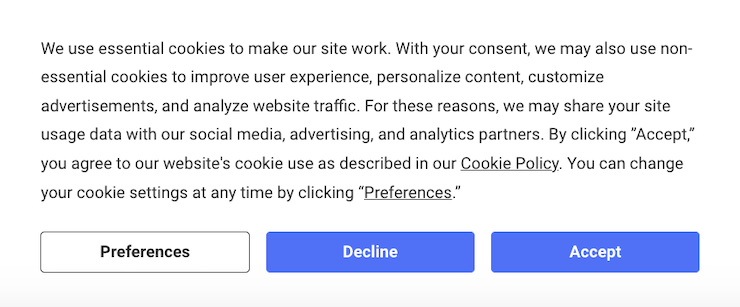
The next screenshot is an example of what your preference center might look like for users.
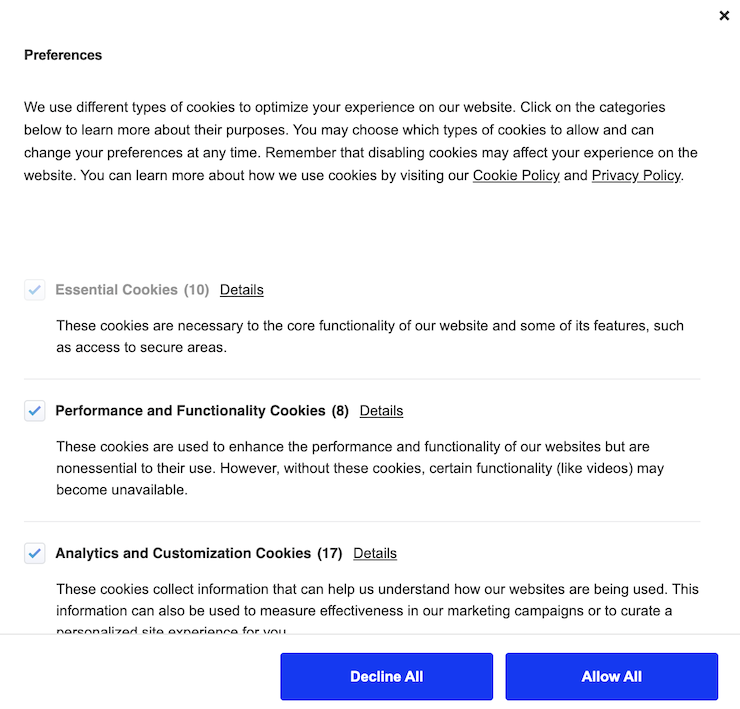
California Consumer Privacy Act (CCPA) Cookie Text Requirements
The CCPA also considers internet cookies a method to collect personal information.
While the CCPA does not require websites to display cookie banners to website users, businesses can satisfy key CCPA requirements more easily by using cookie banners.
Consent banner for advertising cookies
Under the CCPA, third-party behavioral advertising cookies may be considered a sale of personal information and require consent.
Therefore, websites can obtain consent from the website users via a cookie banner to comply with the CCPA and document their compliance with the CCPA’s rules concerning the sale of personal information.
Analytics cookies
Under the CCPA, using analytics cookies may also be considered selling personal information.
However, if a “consumer uses or directs the business to intentionally disclose personal information,” it will not be considered a sale.
Therefore, obtaining consent to analytics cookies via a cookie banner will reduce the risk of non-compliance with the CCPA.
Below, see a sample of what a CCPA-compliant cookie text looks like.
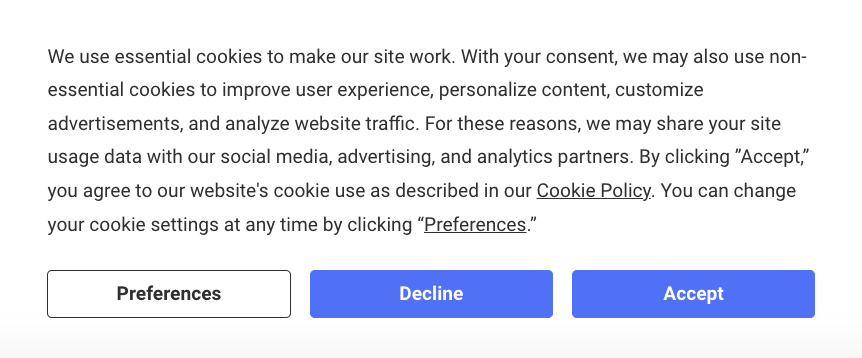
Colorado Privacy Act (CPA) Cookie Text Requirements
Cookies are also considered personal information under the Colorado Privacy Act (CPA).
The CPA requires that businesses obtain affirmative prior consent from consumers for the following processing activities:
- Sensitive data or personal data concerning children
- Selling a consumer’s personal data
- Processing a consumer’s personal data for targeted advertising
- Profiling (following a consumer opt-out)
- Otherwise processing personal data for unnecessary or incompatible purposes
When you use cookies to collect and process data that falls under these categories, you can obtain CPA-compliant consent by using a cookie banner.
However, the consent must be “specific,” “informed,” and through an “affirmative action.”
Therefore, you need to present website users with clear information about what data is collected and for what purposes it is used for the above-mentioned processing activities.
You must use certain language in your cookie text to meet the requirements outlined by this U.S. state law.
Under the CPA, your cookie text must:
- Inform users that your site collects cookies and present them with a cookie policy
- Provide an opt-out mechanism for targeted ads and the selling of their personal data
- Provide opt-in consent requests to collect sensitive personal information
- Provide opt-in consent request to collect data from a known child
Below, see an example of what a CPA-compliant cookie text looks like.
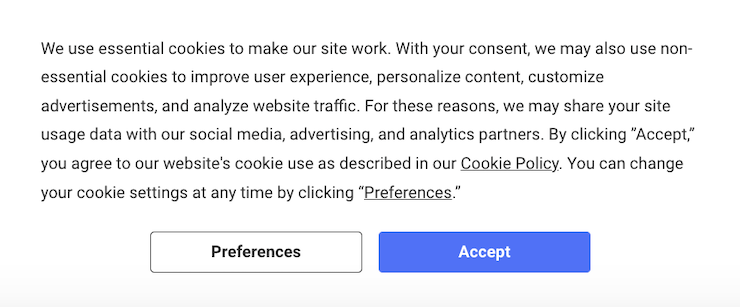
Connecticut Data Privacy Act (CTDPA) Cookie Text Requirements
Under the CTDPA, cookies are personal information, so when you collect sensitive data and need to obtain consent, you must write your cookie text in a specific way for compliance.
The CTDPA is another U.S. state law requiring you to provide consumers with an opt-out mechanism concerning specific internet cookies. Opt-in consent is unnecessary unless you want to collect sensitive information or data from known children.
Your CTDPA cookie text must:
- Explain that your site uses internet cookies and present users with a cookie policy
- Give users a mechanism for opting out of cookies used for the sale of personal information
- Provide an opt-in consent option if you want to collect sensitive personal information
- Provide an opt-in consent option if you’re going to collect data from known children and use this data for targeted advertising
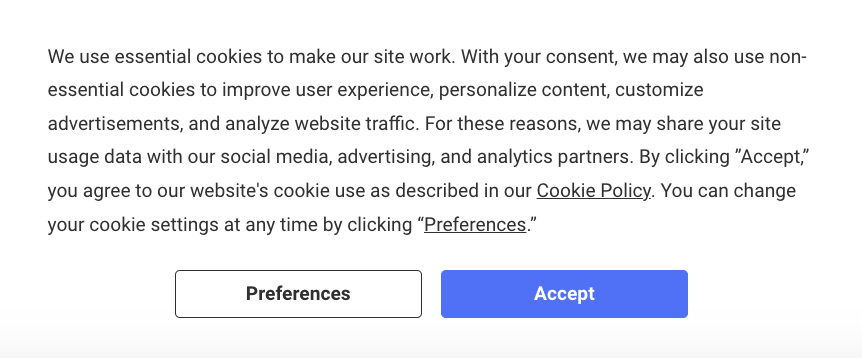
See a great example of a cookie text that complies with the CTDPA below.
Virginia Consumer Data Protection Act (VCDPA) Cookie Text Requirements
The VCDPA defines personal data as “any information that is linked or reasonably linked to an identifiable or identified natural person.”
Therefore, the use of cookies may also fall under the scope of the law, and websites may need to comply with the VCDPA’s transparency and consent requirements.
Under the VCDPA, websites must:
- Provide a mechanism for opting out of the sale of personal information
- Obtain consent for the collection and processing of sensitive data
- Obtain prior consent for precise geolocation information
To use cookies under the VCDPA, you must follow strict legal requirements that impact the cookie text on your consent banner or pop-up.
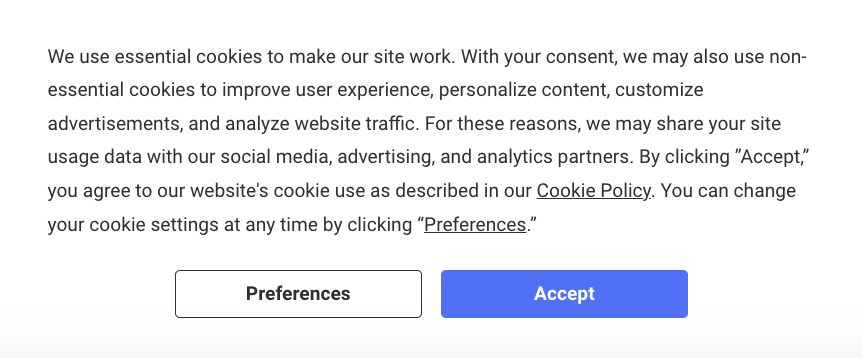
Below is a sample of a VCDPA-compliant cookie text.
Does My Website Need a Cookie Banner?
Every website that uses non-essential internet cookies should have a cookie banner.
It’s essential for meeting legal requirements and it’s a best practice to add one to your site for reasons beyond legal compliance.
For example, using a consent banner is a straightforward way to quickly inform users about the cookies your website wants to use and gives them a chance to agree to them or not.
Being honest about your data collecting practices and the types of cookies you use promotes trust with your visitors because it shows them you respect their privacy and are willing to give them control and choice.
Are There Different Types of Cookie Banners?
Yes. Depending on what laws apply to your business and how you want your banner to appear on your website, there are different types you can choose to use.
For example, you can configure your banner for opt-in consent or for opt-out consent.
Opt-in Consent Explained
Opt-in consent refers to when a consent banner pops up before any cookies are placed on a user’s browser and asks for them to take an active action to show they read and agree to the use of other cookies.
This is also referred to as active consent, or clickwrap consent.
Below is an example of an opt-in consent banner using Termly’s tools:
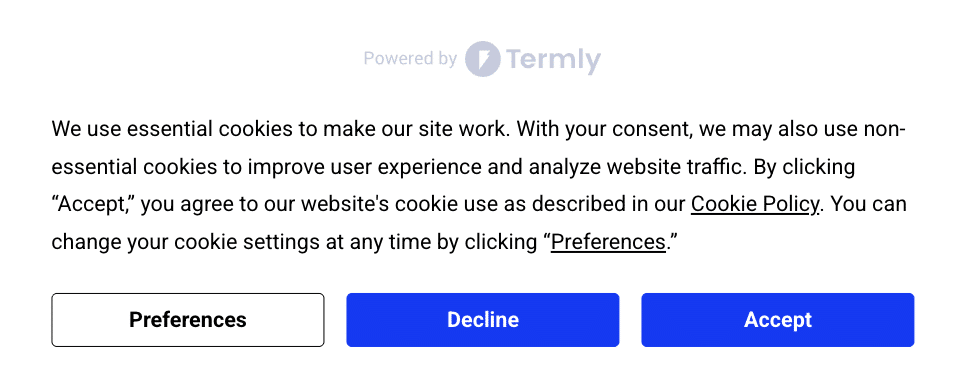
As you can see, it features the following:
- An ‘Accept’ button
- A ‘Deny’ button
- ‘Preferences’
An opt-in banner must give users a chance to say no to the cookies, otherwise, it’s not really considered a form of active, opt-in consent.
Clickwrap consent is known as the more secure and legally compliant method, so if you’re subject to following laws like the GDPR, plan to use this type of consent banner.
Opt-out Consent Explained
Opt-out consent, as required by laws like the CCPA/CPRA, provides users a clear mechanism to opt-out of the sale/sharing of their personal data.
It is distinct from ‘browsewrap,’ which attempts to infer consent from mere use of a site and is widely considered legally risky and insufficient for compliance.
The policy itself then features language like the example below, which implies that the user is expressing their agreement simply by interacting with and using the platform:
‘By continuing to use this website, you consent to out cookie policy’
Below is another example using Termly’s tools, this time, it’s an opt-out consent banner:
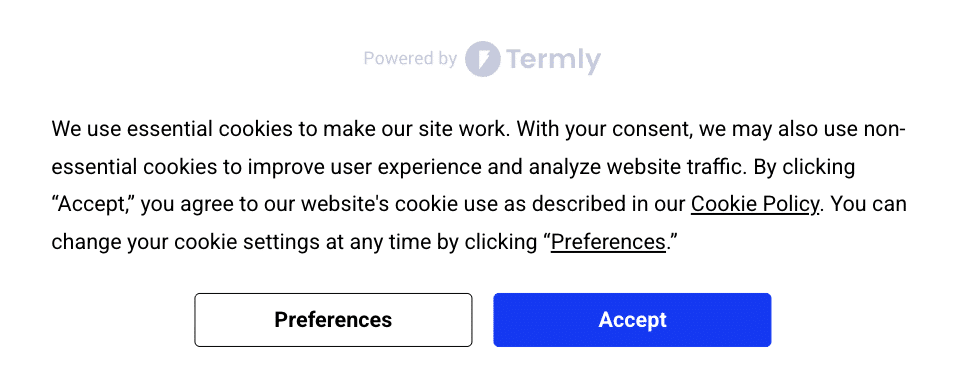
This banner features less than the opt-in banner, and includes the following:
- Accept button
- Link to cookie policy
It’s important to note that this type of banner configuration can help websites comply with U.S. state level privacy laws that don’t necessarily require opt-in consent, but they don’t work under the GDPR.
Different Cookie Banner Styles
There are also different designs or styles of consent banners available, including banners, modals, and tooltips.
Cookie Banner Style Explained
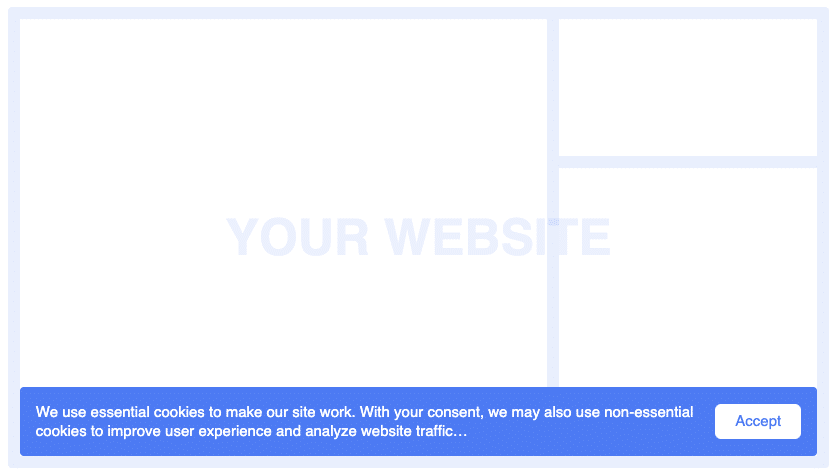
A banner is the most traditional type of style and takes up a small amount of screen usually by spreading across the bottom length or top length of a web page.
It’s noninvasive but still easy for users to spot and interact with, as shown in the screenshot below.
Cookie Modal Style Explained
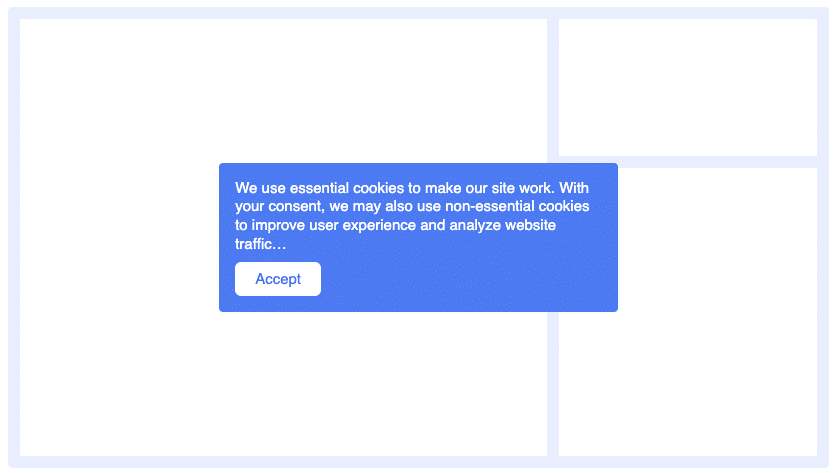
A modal style refers to when the banner appears in the center of the webpage, this way the information on the page is still visible to users but they also see and must interact with the cookie banner itself.
You can see an example in the following screenshot.
Cookie Tooltip Style Explained
Finally, tooltips are smaller rectangle shaped banners that appear in the corner of a website, be it the top right or left side, or the bottom right or left sides.
They also help ensure that the entire page is not blocked from the user but ensure they still see and interact with the banner. See for yourself below.

The style of banner you choose depends on a range of factors, like your website design and overall feel.
You can also try different using different consent banner styles and comparing the data to text if and how it could affect your overall opt-in consent rates from users.
How Can I Create a Cookie Notice?
Your cookie banner should include a well-written cookie text or a cookie notice on it informing users that your website wants to use cookies and is requesting their opt-in or opt-out consent.
Here are several different methods for creating the cookie text/notice for your banner.
Using a Managed Solution to Create a Cookie Consent Notice
Using a managed solution is the easiest way to create and maintain a cookie notice because you can also use it to manage user preferences and keep your website’s data practices transparent.
Tools like Termly’s Consent Management Platform, automatically handle the technical aspects of managing user consent, and can help you create a well-written cookie text that appears on your cookie banner.
Here’s how it works:
- Scan your site to locate and categorize all cookies,
- Review and build your custom cookie consent notice,
- Select from various cookie banner styles and configurations,
- Select applicable consent settings based on your plan and needs,
- Publish your consent policies and add your cookie consent notice directly to your website!
Using a Plugin to Create a Cookie Consent Notice
You can also create a cookie consent notice by using a Plugin, which is another easy solution, especially if you have a website built on platforms like WordPress.
These tools typically integrate directly into your site and help you add a cookie banner with an adequately worded cookie text without much manual setup.
For example, Termly offers a GDPR/CCPA Cookie Consent Banner plugin for WordPress that’s designed to help businesses comply with global data privacy laws like the GDPR, the CCPA, the ePrivacy Directive, U.S. state-level laws, and more.

To use Termly’s WordPress plugin, follow these simple steps:
- Input your website URL so it can be scanned for cookies,
- Create your customizable cookie consent banner,
- Choose your consent settings, like auto-blocking tracking technologies based on user preferences,
- Publish your final cookie consent notice to your website.
Making Your Own Cookie Consent Notice from Scratch
Creating your own cookie consent notice is complex and not always recommended because this process requires so much technical work and ongoing maintenance, and data privacy and internet laws are constantly evolving.
However, you can make a cookie notice from scratch if you want complete control over the language and design.
This approach lets you tailor every detail to your website, but it requires a strong understanding of privacy requirements and best practices.
If you choose this route, make sure your notice is clear, transparent, and gives users real choices about how you collect and handle their data.
Here’s some examples of what you’ll need to do:
- Understand and follow all privacy laws that impact your website and your visitors,
- Find and categorize all cookies and trackers your website uses, label them and present them in a policy to users,
- Build a technically sound consent banner configured to collect and process consent from website visitors in a legally compliant manner,
- Provide users with multiple ways to submit requests to follow through on their privacy rights.
- Maintain secure logs of user consent, and enable then to change their minds easily and withdraw or give consent at any time.
How To Install a Cookie Banner to Your Website
The directions for installing a cookie banner on your website vary depending on what company you choose, and not all options are considered easy, lightweight, or code-free.
Fortunately, Termly’s cookie banner generator is known as one of the easier options on the market.
Just follow these easy steps.
Step 1: Scan your website using Termly’s free cookie scanner.

This will find, label, and categorize all cookies your site uses. It also makes you a custom cookie policy automatically.
Step 2: Review the cookie banner settings from your Termly dashboard.

Configure these settings based on if you need opt-in or opt-out settings.
Pro+ plan users can also set up cross-regional consent options to accommodate users in the U.S. versus those in Europe.
Step 3: Embed your automatically generated cookie banner directly to your website.

It’s easy. Just copy and paste an HTML code snippet into your website and your cookie banner will appear!
Get Started By Scanning Your Website Below
How Termly Helps Businesses Create Cookie Banners
Termly helps businesses create custom cookie banners that align with the major data privacy laws, including the GDPR, the CCPA, and more.
Built by our privacy engineers and backed by our legal team, Termly’s cookie banner has the following features:
- Opt-in and Opt-out consent configurations available
- Regional consent settings
- Script auto-blocking
- Multi-language supports
- Preference center
- Preference logs
- Link to cookie policy
- Website scans and cookie policy generator also available
Termly’s consent banner is known for being incredibly lightweight and easy to set up, often requiring little to no coding.
If your website still needs a consent banner, consider using Termly’s today!

Natasha Piirainen is a privacy writer with a Bachelor’s Degree in English and Philosophy from Wheaton College and over 10 years of professional experience in research-driven content development.
Read all posts by Natasha Piirainen
Reviewed by Masha Komnenic CIPP/E, CIPM, CIPT, FIP
Masha Komnenic is a legal counsel and Termly’s Director of Global Privacy, who received her law degree from Belgrade University. She specializes in implementing, monitoring, and auditing business compliance with privacy regulations (HIPAA, PIPEDA, ePrivacy Directive, GDPR, CCPA, POPIA, LGPD).
Read all posts reviewed by Masha Komnenic CIPP/E, CIPM, CIPT, FIP
Generate a FREE Cookie Banner