

A mobile app privacy policy template is a free tool that helps people create custom privacy policies for your mobile app.
Below, learn how to use Termly’s mobile app privacy policy why most app developers are required to publish one.
You can skip ahead to download our free mobile app privacy policy template below.
- How To Use Termly's Mobile App Privacy Policy Template
- Why Should You Use a Mobile App Privacy Policy Template?
- Mobile App Privacy Policy Template for iOS and Android [Full Text and Download]
- What Is a Mobile App Privacy Policy?
- Do You Need a Privacy Policy for Your Mobile App?
- Do You Need a Privacy Policy for iOS Apps?
- Do You Need a Privacy Policy for Android Apps?
- What Privacy Laws Require Mobile App To Have Privacy Policies?
- What Are The Privacy Policy Requirements for iOS Apps?
- What Are The Privacy Policy Requirements for Android Apps?
- Are There General Privacy Policy Requirements for All Apps?
- How To Give Users Access to Your App’s Privacy Policy
- Examples of a Good Mobile App Privacy Policies
- Mobile App Privacy Policy FAQ
- Conclusion
How To Use Termly’s Mobile App Privacy Policy Template
To use our mobile app privacy policy template, follow these easy steps:
- Choose how you want to download the privacy policy template (as a Word Doc, PDF, or Google Doc, or HTML snippet.
- Read through the entire template, fill in all of the [brackets] with accurate details about your platform,
- Remove any sections that do not apply to your app, and customize any language as needed.
- That’s all it takes!
Why Should You Use a Mobile App Privacy Policy Template?
Privacy policies are long documents that must follow strict legal requirements, and our template helps simplify the entire process for you for free.
Uusing a template to make a privacy policy for your app can benefit you in the following ways:
- Mobile app privacy policy templates are free to download and customize, which allows you to save money but still create a policy that fits your app’s needs,
- Using a template for your mobile app privacy policy ensures that some initial writing is done for you, saving you time,
- A good template, like ours, includes the most common mobile app clauses and are already structured in a way that’s easy for users to read and follow along with.
But if you’re short on time or need help adhering to multiple data privacy laws, try out our Privacy Policy Generator. All you need to do is answer a few questions about your business, and it creates a compliant policy for you in minutes.
Mobile App Privacy Policy Template vs Generator
For some mobile apps, using a template might not be the best option, and you could be better of using a legally backed, comprehensive generator instead.
Check out the table below for examples of when to use a template versus a generator for your mobile app privacy policy.
| Using a Generator Makes Sense When You: | Using a Template Makes Sense When You: |
|---|---|
|
|
Mobile App Privacy Policy Template for iOS and Android [Full Text and Download]
You can download our free mobile app privacy policy template below in Word Doc, PDF, or Google Doc format.
Template Download Options
What Is a Mobile App Privacy Policy?
A mobile app privacy policy informs people about your data collection practices and discloses how your app gathers, stores, and uses personal information.
Clear, conspicuous, and easy-to-read privacy policies are mandated by all of the following data privacy laws from around the world.
Additionally, most app hosting platforms like Apple and Google require developers to post a privacy policy before publishing mobile apps.
How Do I Know If My Mobile App Collects Personal Information?
To know if your app collects personal information, conduct a privacy audit to identify all data your app collects and how it’s used.
This might include the following instances:
- Checkout process
- Email signup forms
- Account registration page
To ensure you don’t miss anything, take into consideration:
- Each type of data category your mobile app collects
- What data any third parties might collect that your app relies on
- Specific common locations where data collection often occurs
- Areas where consumers give voluntary consent to share the data
Do You Need a Privacy Policy for Your Mobile App?
The simple answer is yes, you need a privacy policy if your mobile app falls under situations like the following:
- Your app collects personal data,
- Your app uses a third-party service provider,
- You fall under the jurisdiction of any data privacy laws,
- The iOS or Android platform requires one,
- You want to reassure your app’s users,
- You want to err on the side of caution.
A privacy policy for your app isn’t just a way to meet legal requirements. It’s also a good way to reassure your users.
How Do Mobile App Privacy Policies Help Reassure Users?
Posting a mobile app privacy policy helps ease your users’ concerns and give them confidence in your app because they’ll know their personal information is safe.
Just take a look at these alarming data privacy statistics emphasizing the importance for companies to be honest about their data collection practices:
- 84% of users are more loyal to companies with strong security controls. (Salesforce)
- 54% of users say it’s harder than ever for companies to earn their trust. (Salesforce)
- 39% of users would likely turn away from a company that required them to provide highly personal information. (Akamai)
Transparency builds trust. Retain more customers by publishing a privacy policy for your app.
Do You Need a Privacy Policy for iOS Apps?
Yes, you’re required to post a privacy policy when developing apps for iOS.
Regardless of if you fall under any privacy laws, Apple mandates in their App Store Review Guidelines that all mobile app developers must include a privacy policy in an iOS application.
Do You Need a Privacy Policy for Android Apps?
Yes, as of April 22, 2022, every application published by the Google Play Store must have a privacy policy that declares how it collects, protects, and handles private user data.
This is mentioned in Android’s mobile app privacy policy guidelines from the Google Play Console help center.
What Privacy Laws Require Mobile App To Have Privacy Policies?
Here’s a list of several data privacy laws from across the globe that impact or require you to have a privacy policy for your mobile app:
- General Data Protection Regulation (GDPR)
- California Consumer Privacy Act (CCPA)
- California Online Privacy Protection Act (CalOPPA)
- Virginia Consumer Data Protection Act (VCDPA)
- Children’s Online Privacy Protection Act (COPPA)
Let’s discuss the requirements of each of these laws in the following sections.
How Does The GDPR Impact Mobile App Privacy Policies?
If your app is available to those in the EU, you’re subject to comply with the GDPR and you’ll need a comprehensive mobile app privacy policy that details what, how, when, with whom, and where data is collected.
The GDPR also mandates that businesses give users the capability to revoke consent, and access or delete data.
Ignoring the GDPR and not having a privacy policy for your app can get you fined up to €24 million ($23 million) or 4% of your app’s annual global revenue.
How Does The CCPA Impact Mobile App Privacy Policies?
Under the CCPA, businesses must provide app users with a privacy policy that discloses:
- All consumer rights
- How consumers can request to delete, access, or change their personal data
- How minors or their legal guardians under age 16 can opt out of the sale of their personal data
Consumers also have the right to pursue private legal action against you if their data is breached or their login credentials have been compromised due to your lack of security measures.
How Does CalOPPA Impact Mobile App Privacy Policies?
The original US law that privacy policies was the California Online Privacy Protection Act or CalOPPA. It applies to any business, including those running mobile apps.
According to CalOPPA, a privacy policy for a mobile application must:
- Provide information about modifications and how they will be made
- Give information about any third-parties collecting user data
- Be presented as a link from the mobile app’s homepage, which must contain the word “privacy”
Failure to comply with CalOPPA results in fines of up to $2,500 per each individual violation, meaning fines over a quarter of a million dollars can easily be levied against a small mobile app company that reaches only 100 users per week.
How Does The VCDPA Impact Mobile App Privacy Policies?
In January 2023, the US state of Virginia introduced the Consumer Data Privacy Act (CDPA), requiring mobile app developers to post a clear, reasonably accessible, and meaningful privacy notice.
To comply with the CDPA, your mobile app privacy policy must specify all of the following:
- The purpose of processing personal information
- Categories of data processed
- Types of data shared with third parties
- Categories of data sold to third parties
- Disclose the categories of third parties themselves
- Information about how consumer requests can be submitted
- A mechanism for appealing decisions related to consumer requests
- Clearly disclose the processing of personal data for targeted advertising
- The right to opt out of the processing of personal data
How Does COPPA Impact Mobile App Privacy Policies?
To help protect children’s privacy and keep them safe online, the Federal Trade Commission (FTC) enforces the Children’s Online Privacy Protection Act (COPPA), which requires websites, mobile apps, and other online services to post compliant privacy policies and obtain consent from parents before collecting data from minors in the U.S.
COPPA is why many websites and apps don’t allow users under 13 to access the content or register an account.
In addition to requiring privacy policies, COPPA imposes fines on companies that fail to follow the guidelines.
For example, in 2019, YouTube was issued a COPPA fine of $170 million for illegally harvesting children’s personal data and targeting ads at kids without consent from legal guardians.
What Are The Privacy Policy Requirements for iOS Apps?
To meet the requirements for making a privacy policy for an iOS app, you’ll need to:
- Determine which data privacy laws apply to your app,
- Identity what personal information your app collects,
- Outline how and why you collect and use personal information,
- Verify any third parties you rely on comply with Apple’s policies,
- Outline your data retention and deletion policies,
- Display your iOS mobile app privacy policy in the correct locations.
What Are The Privacy Policy Requirements for Android Apps?
To create a compliant privacy policy for Android apps, follow these steps when publishing an app on the Google Play Store.
- Determine which data privacy laws apply to your app,
- Identity what personal information your app collects,
- Outline how and why you collect and use personal information,
- Verify any third parties you rely on comply with Google’s policies,
- Follow additional guidelines if you collect sensitive personal information,
- Pay attention to the Google Play Policies updates timeline,
- Display your Android mobile app privacy policy in the appropriate places.
Are There General Privacy Policy Requirements for All Apps?
While the specific contents of your privacy policy will depend on what law apply to you, here are some general privacy policy requirements you can consider following to help create a compliant policy:
- Mention all types of personal information you collect
- State how you use and share personal information
- Disclosure of your use of any third-party services
- Explain users’ control and rights over their data
- Describe how you’ll update users about changes to your policy
How To Give Users Access to Your App’s Privacy Policy
To give users access to your mobile app privacy policy, link to it in the following locations:
- Embedded directly in your app
- Linked to a dedicated webpage
- On the app store
Why Embed Your Mobile App Privacy Policy Directly in the App
Dedicate a space within your mobile app to display your privacy policy so users can easily navigate to it at any time.
Sharing the link like this ensures that users are aware of its presence, that all legal policies are only a few clicks away, and they can consult it at any time without being inconvenienced.
Why Link Your Mobile App Privacy Policy to a Dedicated Webpage
Many developers use an app privacy policy URL to link to the policy within the app itself, and give users access to it by publishing a hyperlink containing the word “privacy.”
Clicking the link opens the privacy policy in a new internet browser window which may be hosted by a third party or part of the company’s website.
If your company has a website, using the same policies for both is good practice.
Why Include Your Mobile App Privacy Policy In The App Stores
You can also include a link to your policy on your app’s profile page in whichever app store you choose to sell your product.
Not only is this required by both Apple and Google, but it also allows users to view your policy before downloading your application.
Examples of a Good Mobile App Privacy Policies
Below, browse through are several examples of real life privacy policies for mobile apps.
Instagram’s Mobile App Privacy Policy
The first mobile app privacy policy example we’re showcasing comes from Instagram. Owned by Meta, they use identical policies for all of their services and mobile applications.
To find their privacy policy in the app, navigate to the Settings section and select About.
Once there, select Privacy Policy to view the current version of the agreement directly within the app itself, screenshotted for you below.
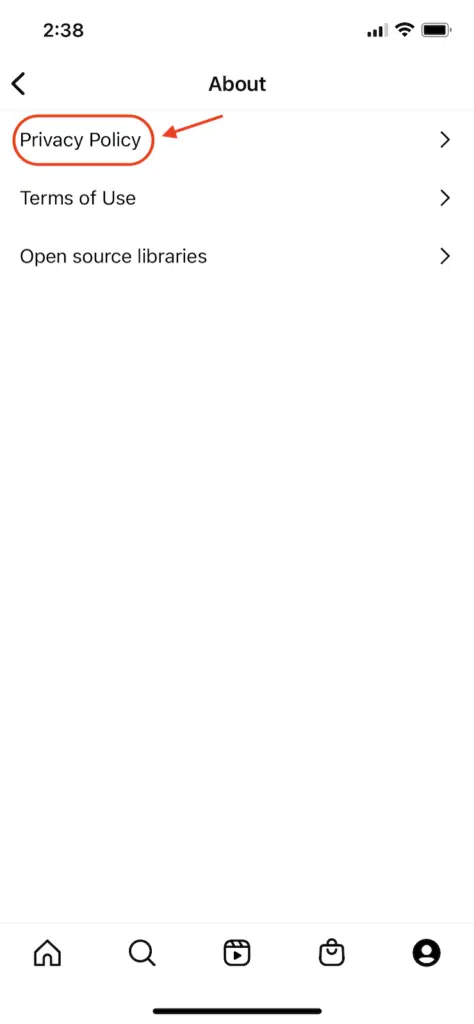
Meta as a whole adopted a more up-front, user-friendly approach to its legal policies in response to public concerns over the sharing of personal information.
The policy is now formatted in a frequently asked questions (FAQ) format, which is easy to read.
Below, see an example of a clause in their policy outlining what information they collect, which even features a short video.
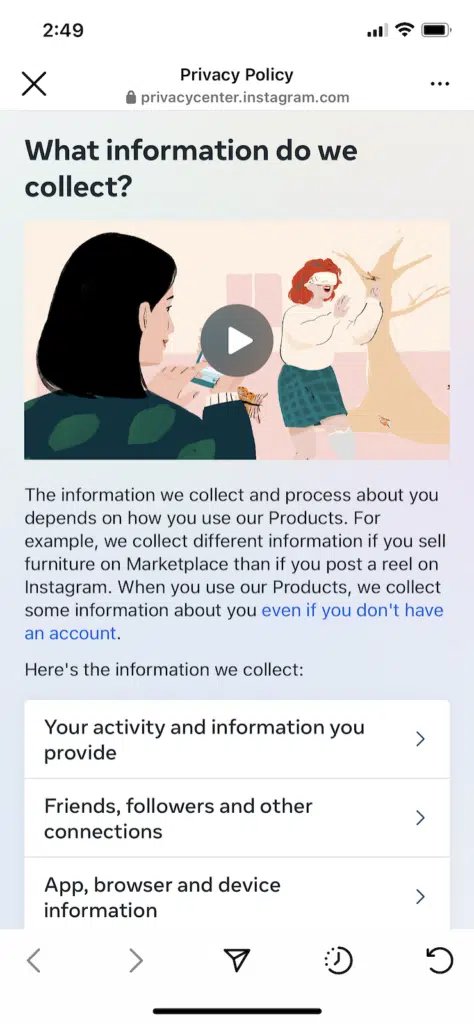
The policy then explains how that personal information gets used by Instagram, Facebook, and Meta, which is still organized in an FAQ style, as shown below.
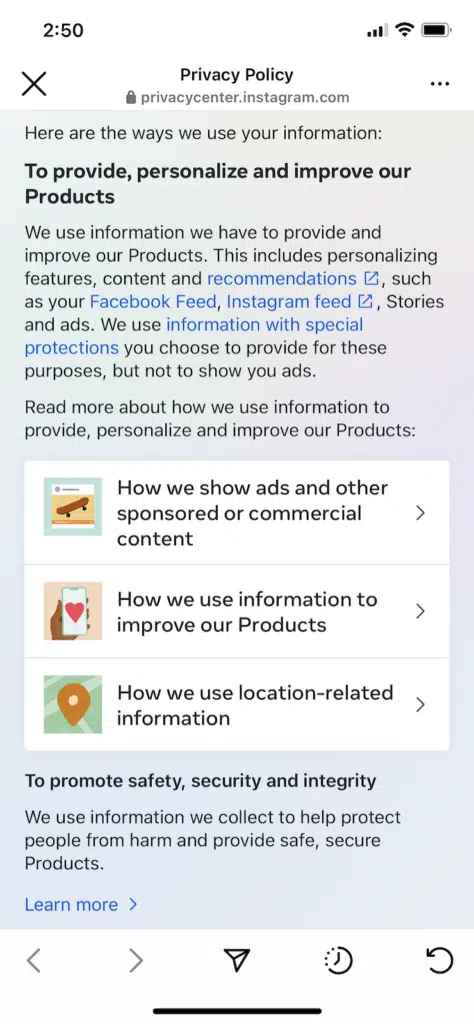
While adding videos is a nice touch, it’s unrealistic for most businesses. However, when you make your privacy policy for your mobile app, try to be consistent with your formatting, like Instagram.
Spotify
The next mobile app privacy policy sample comes from Spotify, a music streaming service.
You can find Spotify’s privacy policy in the app by navigating to Settings and selecting About, pictured below.
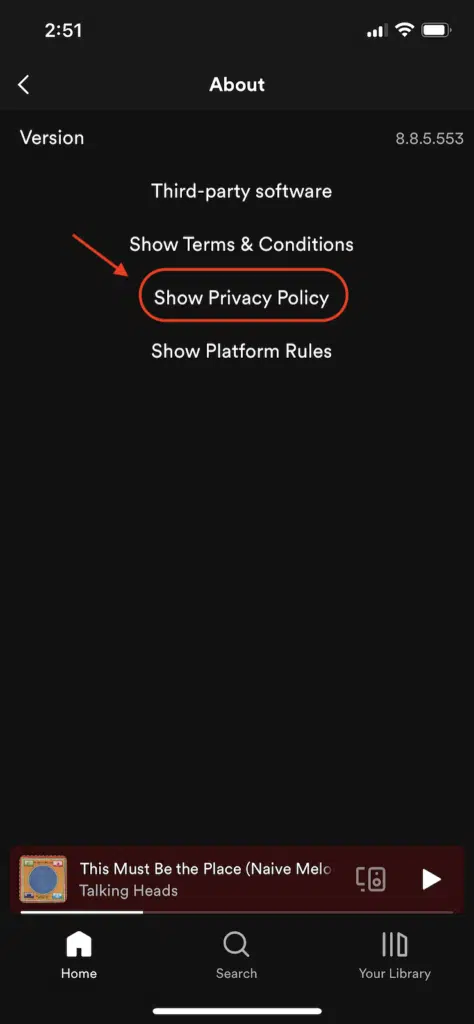
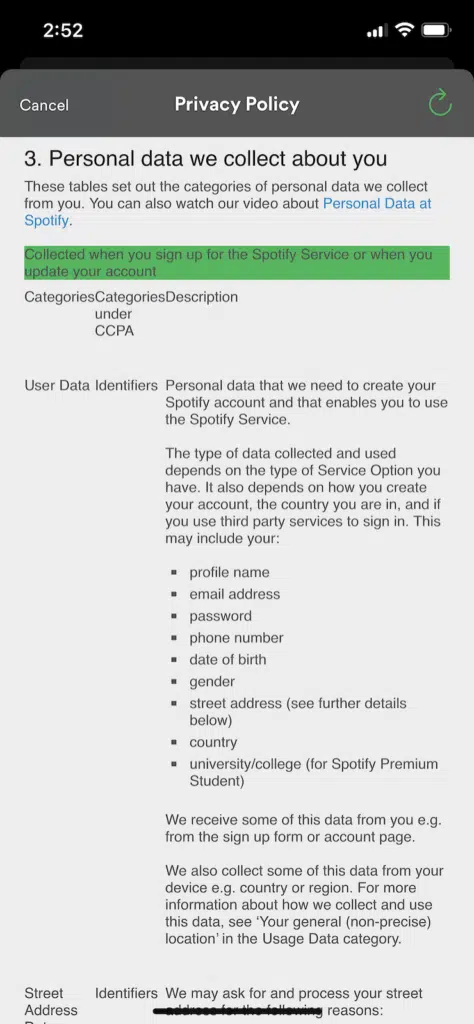
We like how Spotify organizes the information in their privacy policy using very easy-to-read tables.
Below, see what their clause featuring a table explaining what data they collect looks like through their app.
We also like how Spotify clearly informs their users how they’ll be updated about any changes to the policy, shown for you in the screenshot below.
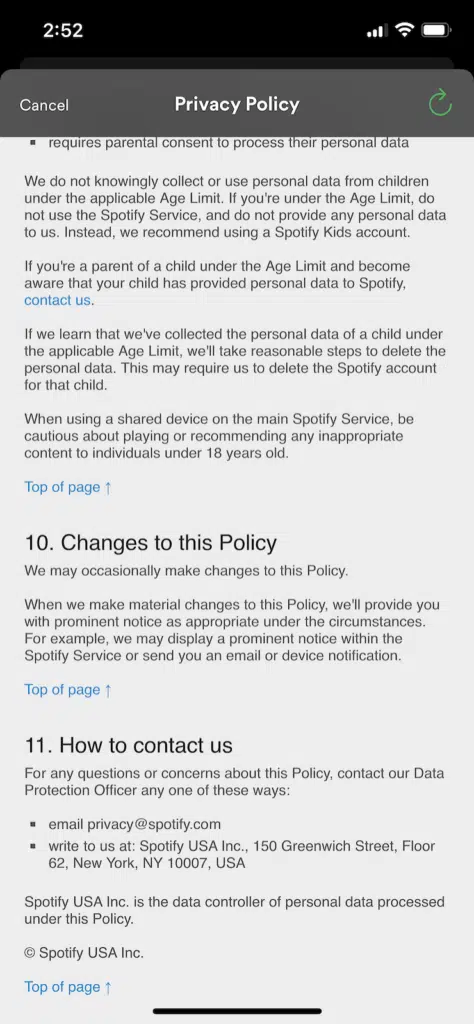
This is a necessary clause to add to your mobile app privacy policy, especially because under laws like the amended CCPA, you must update your policy at least once every 12 months.
Snapchat
Next, we’ll look at the mobile app privacy policy from Snapchat, a service that is exclusively on mobile devices and allows for taking, editing, and sharing photos.
To navigate to their privacy policy within the app, go to your Settings and scroll down until you see the following options we’ve screenshotted below.
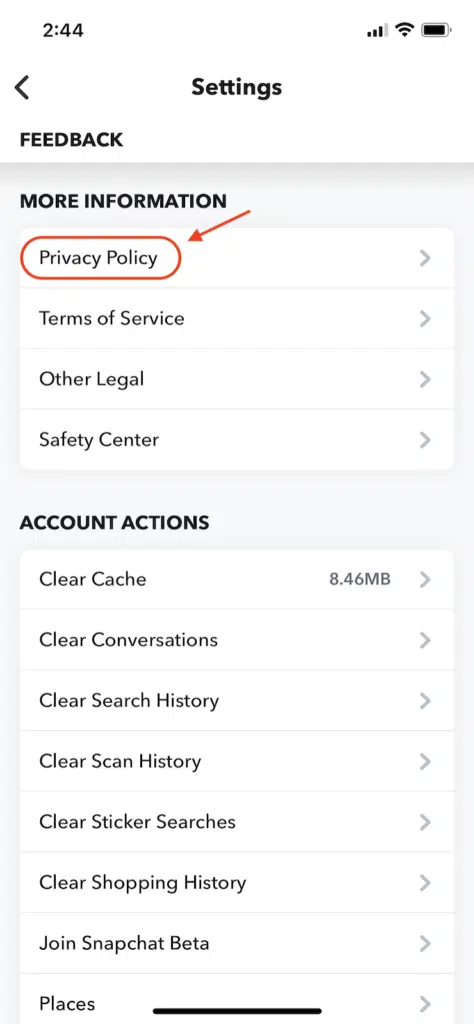
If you click on Privacy Policy, you’ll find that it’s clearly laid out and very approachable.
Below, see an example of Snapchat’s clause explaining what they do with data they collect that is provided by the consumer.
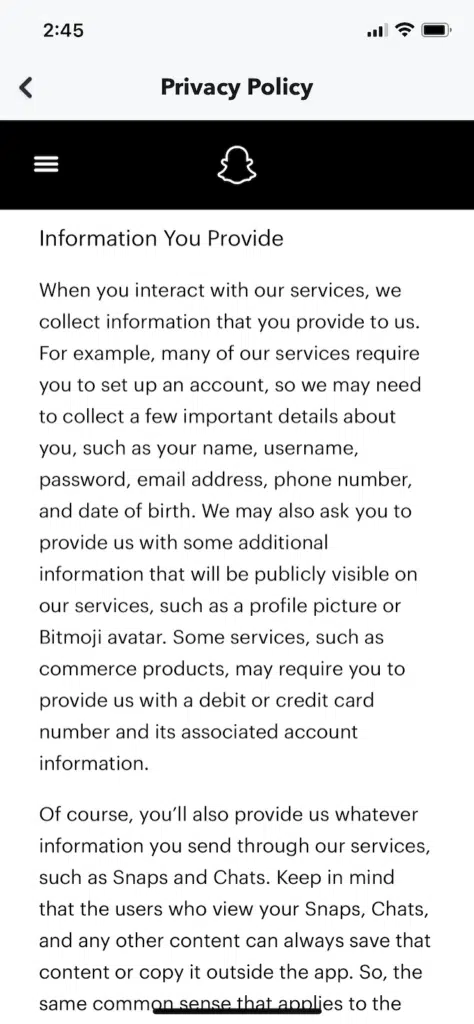
We like how Snapchat includes a clause covering their use of cookies and other trackers directly in their privacy policy, shown below.
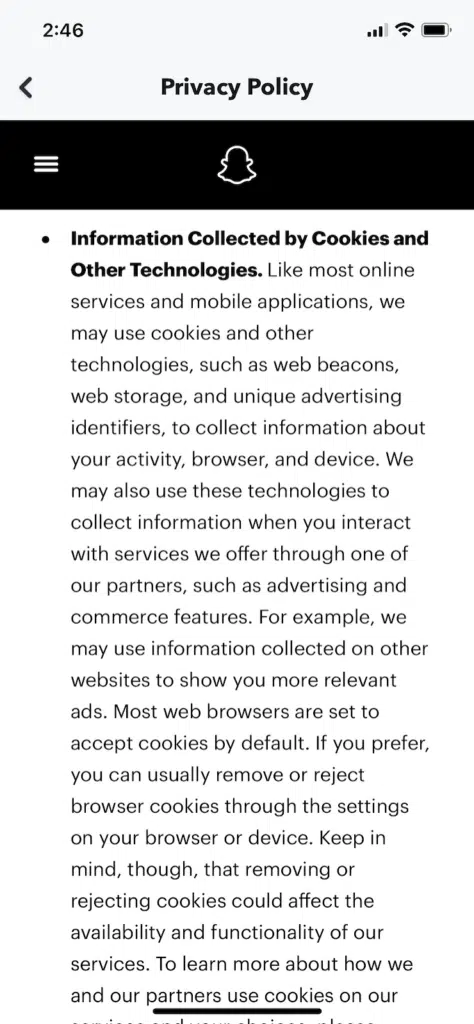
Off-screen, there’s a live link to their cookie policy. If your mobile app uses cookies or trackers, understand that some of that data qualifies as personal information under data privacy laws and is subject to legal requirements and guidelines.
Like Snapchat, it’s in your best interest to provide a link to your cookie policy within your privacy policy for your mobile app.
Pizza Hut
Lastly, let’s consider the Pizza Hut mobile app privacy policy, which you can find within the app by navigating to your Profile and selecting Legal Information.
Once there, you can also access the CCPA-compliant “Do Not Sell My Personal Information” link, pictured below.
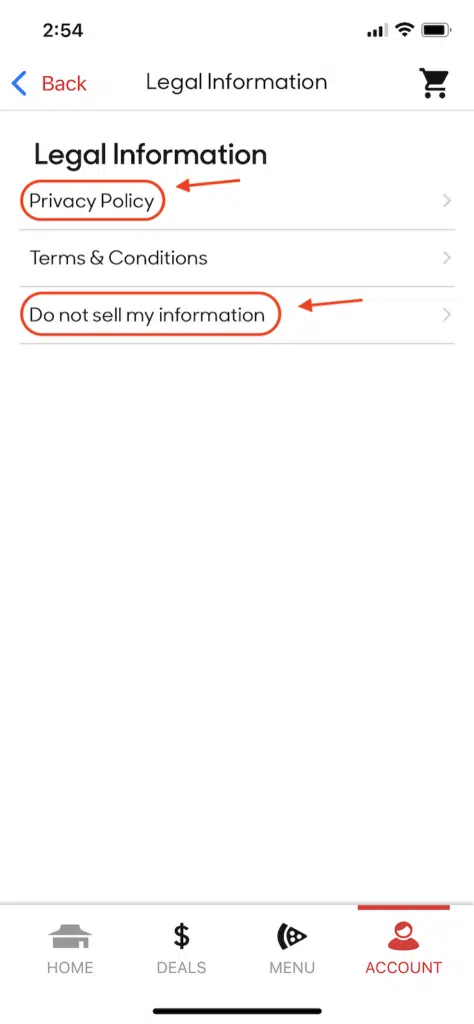
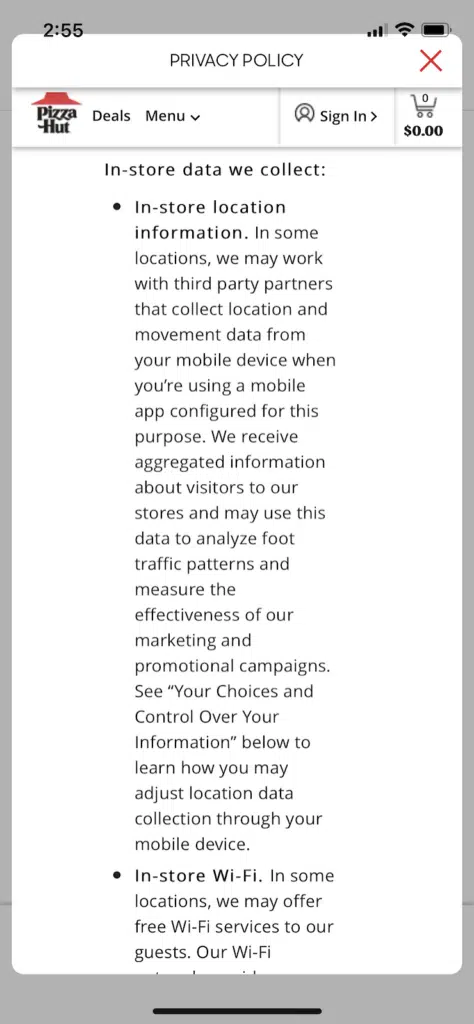
Because Pizza Hut has physical locations, they include a clause in their policy outlining what information is collected about their consumers who come into their brick-and-mortar storefronts, shown below.
Pizza Hut includes a clause outlining what parents and guardians can do if they suspect the company accidentally collected information about children, because they don’t target services to minors.
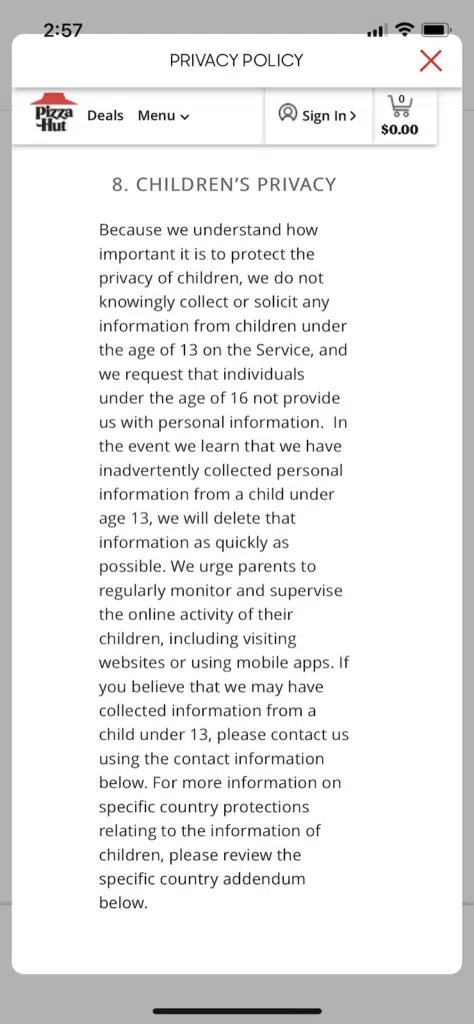
Even if you don’t market to minors, follow Pizza Hut’s lead and put a similar clause in your mobile app privacy policy.
This helps remove liabilities from your plate and creates a straightforward, easy-to-follow process if you ever find out you’ve accidentally collected information about children.
Mobile App Privacy Policy FAQ
Below, see some answers to frequently asked questions about mobile app privacy policies.
Do I need a privacy policy for iOS apps?
Yes, Apple requires that all iOS apps link to a privacy policy regardless of if you fall under the jurisdiction of any data privacy laws.
Do I need a privacy policy for Android apps?
Yes, Google requires all Android apps to have a link to a privacy policy and declare how they collect and handle user data in the Data Safety section of the Google Play store.
What laws require a mobile app privacy policy?
Some of the data privacy laws that require mobile apps to have privacy policies are the:
- General Data Protection Regulation (GDPR)
- California Online Privacy Protection Act (CalOPPA)
- California Consumer Privacy Act (CCPA)
- California Privacy Rights Act (CPRA)
- Virginia Consumer Data Protection Act (CDPA)
- Children’s Online Privacy Protection Act (COPPA)
- Personal Information Protection and Electronic Documents Act (PIPEDA)
What should my mobile app privacy policy include?
Your mobile app privacy policy should include all of the following information in distinct clauses:
- Types of personal information you collect
- How you use and share personal information
- Disclosure of your use of any third-party services
- Explain users’ control and rights over their data
- Describe how you’ll update users about changes to your policy
Customize your agreement to reflect the unique aspects of your mobile app.
How often do I need to update my mobile app privacy policy?
You should update your mobile app privacy policy once every 12 months if you fall under the jurisdiction of the amended CCPA.
Otherwise, update it whenever you change any of your privacy practices.
Can I copy someone else’s mobile app privacy policy?
No, don’t copy someone else’s mobile app privacy policy, as that’s plagiarism, and the policy won’t reflect your privacy practices.
Is a privacy policy template enough for my mobile app?
Downloading and customizing a privacy policy template is enough for most mobile apps.
But if your app collects highly sensitive information or requires a more comprehensive privacy policy, consider using a Generator or reaching out to a lawyer or data privacy expert.
When do I need a privacy policy for an app?
You need a privacy policy for your app if it falls under the jurisdiction of data privacy legislation like the GDPR or the CCPA, or if you use third-party app platforms that require privacy policies as a condition for publication.
Legally, your app may also need a privacy policy if it markets to specific demographics, like minors.
Conclusion
If you develop mobile apps, you likely need a privacy policy due to regional data privacy laws or the guidelines outlined by third-party app hosting platforms like Apple and Google.
Even if your app doesn’t collect personal data or isn’t under the umbrella of any legislation, both Apple and Google require you to link to a privacy policy stating as much.
It is clearly outlined in their developer guidelines that all responsibilities and liabilities fall on you, the app developer.
Luckily, privacy compliance doesn’t have to be complicated.
You can make a policy that complies with Apple and Google’s developer guidelines in minutes by downloading and customizing our free privacy policy template for mobile apps

Written by Hanna De La Garza
Hanna De La Garza is a privacy writer at Termly with a Bachelor’s Degree in Journalism from the University of Florida. She creates engaging resources on data privacy, consent management, regulatory updates, and more.
Read all posts by Hanna De La Garza
Reviewed by Masha Komnenic CIPP/E, CIPM, CIPT, FIP
Masha Komnenic is a legal counsel and Termly’s Director of Global Privacy, who received her law degree from Belgrade University. She specializes in implementing, monitoring, and auditing business compliance with privacy regulations (HIPAA, PIPEDA, ePrivacy Directive, GDPR, CCPA, POPIA, LGPD).
Read all posts reviewed by Masha Komnenic CIPP/E, CIPM, CIPT, FIP