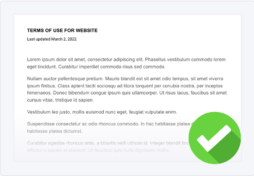


A terms and conditions template is a free tool that helps websites jump-start the process of creating a terms and conditions agreement.
This policy outlines the guidelines users are expected to follow and covers topics like dispute resolutions, payment terms, and more.
Below, I walk you through how to use our terms and conditions template, and explain why you should have one, what goes into it, and how to properly present it to your users.
- How To Use a Terms and Conditions Template
- Download Our Free Terms and Conditions Template
- Terms and Conditions Template vs Generator
- What Are Terms and Conditions?
- Are Terms and Conditions Legally Required?
- Why Should I Have a Terms and Conditions Agreement?
- What Clauses Should You Include in Your Terms and Conditions?
- Where Should You Post Your Terms and Conditions?
- How To Make Your Terms and Conditions Agreement Enforceable
- Exmaples of Good Website Terms and Conditions
- Other Ways To Make a Terms and Conditions Agreement
- Terms and Conditions FAQs
- Conclusion & Additional Resources
How To Use a Terms and Conditions Template
Using our terms and conditions template is incredibly simple and free, just follow these steps:
- First, choose how you want to download the agreement (HTML, PDF, Word doc, or Google doc) in the blue box below.
- After you download the document, manually change the purple text so it accurately reflects different details about your business.
- Remove any clauses that do not apply to your business. You can also add new custom clauses as needed.
- Publish the final document on your website in places like the footer, account login pages, and payment screens.
- That’s all it takes!
Download Our Free Terms and Conditions Template
You can download our free terms and conditions template in any of the following ways:
- HTML
- Word doc
- Google doc
Additional Template Download Options
Our terms and conditions sample text is suitable for the following websites and platforms:
- Small business website
- Online shop
- Mobile app
- E-commerce / online store
- Online store
- Affiliate program
- Retail website
- Online payment
- Subscription
- Free trial
- Online sales
- Forum
- Blog
- Desktop app
- Software as a Service (SaaS)
- Facebook app
- And more!
Terms and Conditions Template vs Generator
Sometimes it might make more sense to use a free template, other times it might be worth paying for a generator, as shown in the table below:
| Using a Generator Makes Sense When You: | Using a Template Makes Sense When You: |
|---|---|
|
|
When NOT To Use a Template
It might not make sense to use a free template to make your terms and conditions agreement if your platform requires a more customized, long-form, comprehensive agreement.
Instead, using a generator might be faster, easier, and more efficient.
This might be the case for platforms that:
- Foster an interactive community of users,
- Sell ecommerce goods that can be returned or exchanged,
- Need to outline copyright and/or fair use information,
- Work in an industry that require disclaimers,
- Need to explain warranty limitations to users.
What Are Terms and Conditions?
A terms and conditions agreement outlines the rules and expectations people must follow when accessing your platform and informs them about what they can expect from you.
Whether you call it a terms of use, terms of service, or terms and conditions, this powerhouse document helps maintain control over your site (per applicable laws) by explaining the following:
- Establish and clarify your intellectual property rights
- Limit your liabilities
- Outline your dispute resolution options
- Disclose your governing laws
- Establish payment terms
- Include shipping policy and return and refund details
- Inform users about your privacy policy
- Outline acceptable uses, prohibited behaviors, and their consequences
This agreement helps answer common customer service questions and provides clear protocols if users try to take advantage of your operations.
It’s also required by some parties if you’re engaging in certain behaviors such as using an SMS broadcast service.
Are Terms and Conditions Legally Required?
Terms and conditions agreements aren’t legally required, but it’s in your best interest to post one on your website or mobile app because it provides an additional layer of legal protection.
According to the American Bar Association (ABA), some specific legal disclosures apply to certain transactions and must be made as written statements, like stipulations outlined by:
You can add these disclosures as clauses in your website’s terms and conditions agreement.
In the event of a dispute, arbitrators may consider multiple facets of your T&C document to determine whether each party acted within their rights.
While not guaranteed to hold up in court, you have a better chance if you can prove your users read and agreed to the policy.
Why Should I Have a Terms and Conditions Agreement?
There are several reasons why you should post a terms and conditions on your website or app, as this document helps:
- Limit your liabilities: Businesses can use terms and conditions agreements to limit different liabilities, which is why almost every one of these documents includes a warranty disclaimer and a no-responsibility clause.
- Protect your website against abusive users: If your site allows users to generate content, you can use your terms and conditions to establish appropriate and prohibited activity on your platform and explain your rights to remove abusive users and content that violates the guidelines. You might even make an acceptable use policy that’s part of your terms but can be shared as a separate document to explain community guidelines so your users know exactly what they can and can’t post to your platform.
- Establish your intellectual property rights: Your terms and conditions agreement is a great place to disclose and protect your intellectual property rights, which helps prevent ownership disputes and copyright infringement. Adding an intellectual property disclosure clause to your terms and conditions text informs users about what content, materials, and branding you own and don’t want illegally copied, reproduced, or shared. If you catch your users copying your content, having this clause in your terms and conditions agreement can help if you pursue legal action against them.
- Create a dispute resolution process: A terms and conditions agreement helps inform users about your dispute resolution options and explains which laws govern your policy. This way, if a dispute arises between you and a user, there’s a clear process for both parties to follow. Any involved courts will use the governing law to interpret the terms and conditions agreement and its effects.
What Can’t a Terms and Conditions Agreement Do?
Terms and conditions agreements can help protect your platform, but they cannot do the following:
- They cannot replace your privacy policy or cookie policy. Do not combine these three policies, this could put you at a legal risk. Keep all three separate and ask for separate agreement to each policy from your users.
- They cannot enable you to set any rule you desire. You can only set rules that fall within applicable laws and regulations. You cannot just write whatever you want in the policy and expect it to be legitimized.
What Clauses Should You Include in Your Terms and Conditions?
The clauses you should include in your terms and conditions agreement varies depending on your industry and how consumers interact with your website or app.
To help you out, I’ve compiled a gigantic list of the most common clauses that appear in terms and conditions agreements.
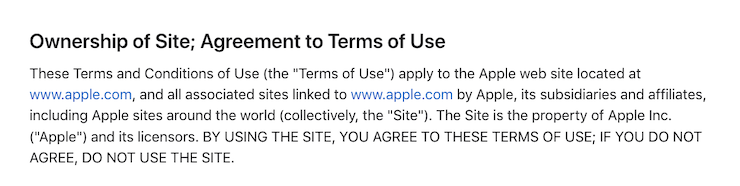
What Goes Into The Introduction Clause?
Your terms and conditions agreement should start with an introduction letting users know what they’re reading, who you are, and to who the terms apply.
Within this clause, explain that anyone using your service must follow the terms and continuing to operate your platform implies they agree to them.
This is called implied or browsewrap consent and is standard in most website terms and conditions documents.
See an example of this terms and conditions clause from the electronics company Apple below.
What Goes Into The Intellectual Property Clause?
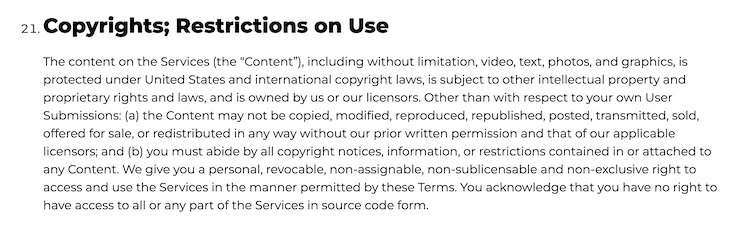
Your terms and conditions should also have an intellectual property clause informing users about your ownership rights, copyrights, and trademarks.
Simply state that by agreeing to your website terms and conditions, users agree that:
- You own all marks and ideas
- They will not sell, modify, rent, loan, share, or distribute your content in any way
- They will not use your material in any manner except for noncommercial, personal uses
Below, see a sample of how media group Vox Media Company phrases this clause in their terms and conditions agreement.
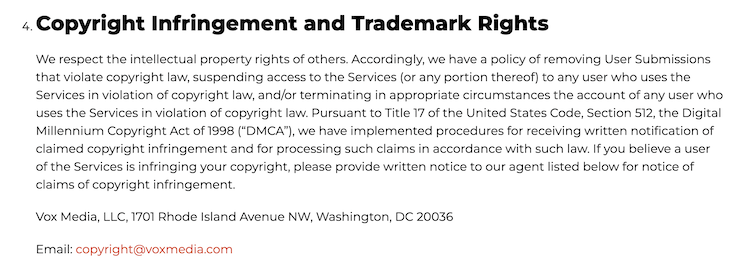
What Goes Into The Digital Millennium Copyright Act Notice and Policy?
For websites in the U.S., your terms and conditions must explain that you’ll remove material that infringes users’ copyright according to the Digital Millennium Copyright Act (DMCA) as required by US copyright laws.
Below, see another sample of this terms and conditions clause from Vox.
What Goes Into The User Contribution Clause?
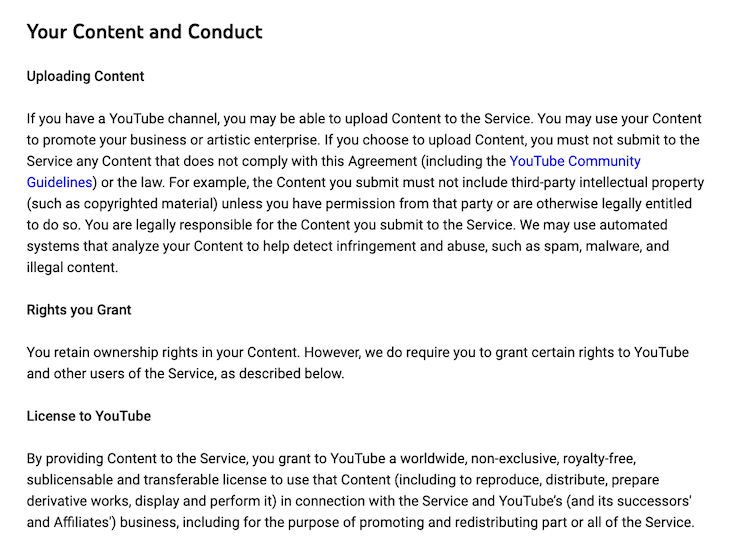
If your site or app allows users to create and share content, include a contribution clause in your terms and conditions explaining their rights over their posts.
Take, for example, YouTube’s contribution clause, which explains what rights content creators retain over the videos they share.
What Goes Into The Third Parties Clause?
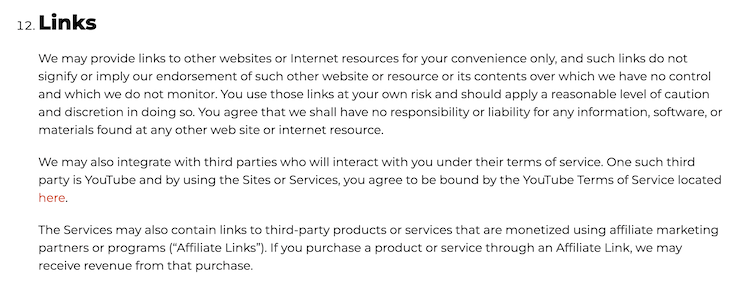
If your website links to external sources, put a third parties clause in your terms and conditions agreement explaining that you’re not responsible for the content on the sites you link to.
Below, see an example of how Vox discloses third-party links in their terms and conditions.
What Goes Into The User Registration Clause?
If your site allows users to create user profiles, add a user registration clause to your terms and conditions template to set proper customer expectations.
Here, you can remind users that their user credentials should always be kept confidential, they’re responsible for keeping it safe, and they need to contact you immediately if their credentials get stolen or someone gains unauthorized access to their account.
Below, see a sample of this clause in Spotify’s terms and conditions agreement.

What Goes Into The Acceptable Uses Clause?
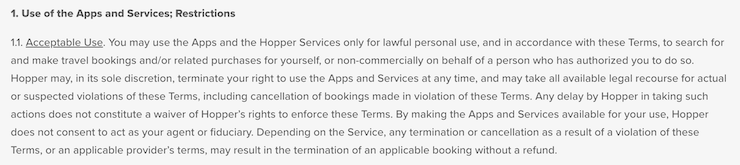
If you allow users to interact with one another on your website or app, include an acceptable use clause in your terms and conditions to outline what actions and behaviors are permitted, including following other policies and terms.
Check out how the popular travel app Hopper informs users of acceptable use:
If it makes sense for your business, you can separate these rules into a standalone acceptable use policy (AUP) document that’s easier to share with your audience.
Just remember to establish that it’s still part of your overall terms.
What Goes Into The Prohibited Activities And Restrictions Clause?
You should also include a clause in your terms and conditions that explicitly lists prohibited activities to stop visitors from misusing your site.
Most companies will ban users for the following:
- Advocating violence
- Posting discriminatory, abusive, threatening, pornographic, or offensive content
- Using the platform or site for illegal activities
- Sending junk mail, spam, or chain letters
- Exposing another user’s personal information, including username(s) and password(s)
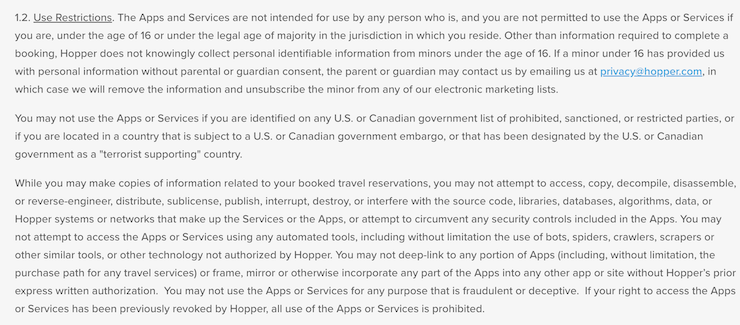
Below, see another example from Hopper’s terms and conditions.
What Goes Into The Suspension And Termination Clause?
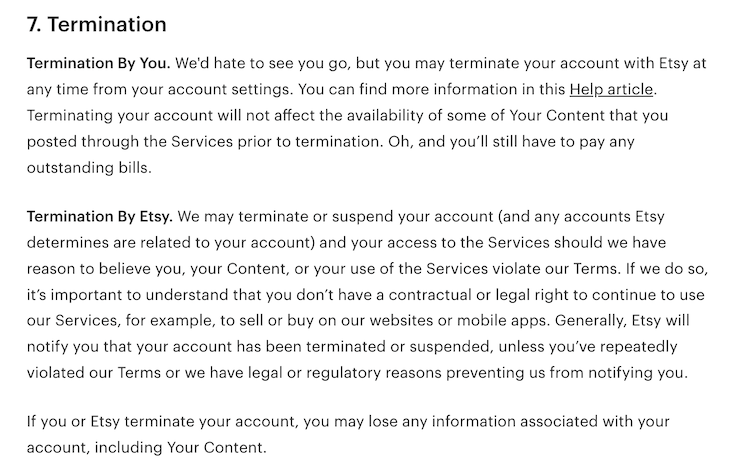
In your terms and conditions template, adding a suspension and terminations clause protects your site or app from abusive users by outlining your right to suspend accounts that violate your terms and delete their content.
You can also explain how users can delete or terminate their own accounts, which is particularly useful if you offer Software-as-a-service (SaaS) applications.
Below, see an example of this clause from the terms and conditions for the ecommerce company Etsy.
What Goes Into The Site Management And Support Clause?
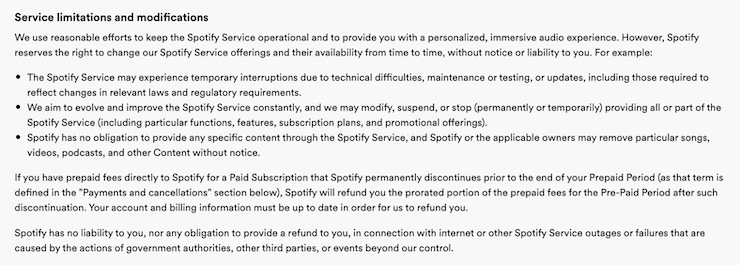
Add a site management or support clause to tell users how you run your site or service and to give users a better understanding of how your service works.
Companies typically outline the following details:
- When they provide updates and monitor the site or service
- When they perform routine inspections or system administration
- Situations when they can refuse service or access to existing users and individuals
- When they provide the service and when the help desk is available
Below, see how Spotify phrases this clause in their terms and conditions agreement.
What Goes Into The Pricing And Payment Terms Clause?
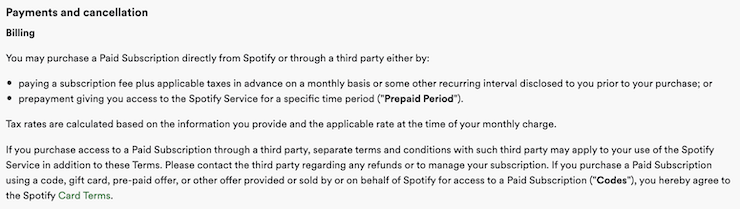
Include a section in your terms and conditions explaining your payment terms, like:
- How you charge customers
- What forms of payment you accept
- Other relevant details
Use phrases such as “as available” for services and “as provided” for items to lower the chances of disputes.
Below, see a sample of this clause from the mobile service provider Spotify’s terms and conditions agreement.
What Goes Into The Shipping Policy Clause?
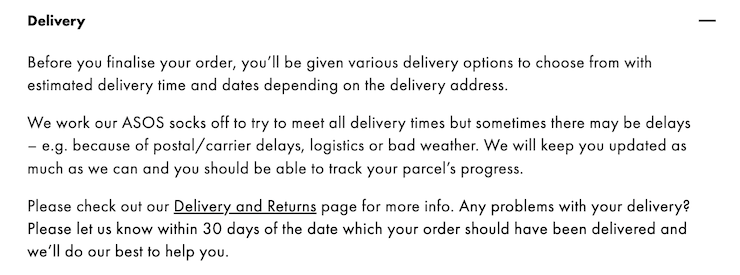
Your terms and conditions agreement is a great place to link to your shipping policy and outline some of your processes, as this helps answer common customer service questions.
Below, see an example of how clothing retailer ASOS phrases this clause in their terms and conditions agreement.
What Goes Into The Returns And Refund Policy Clause?
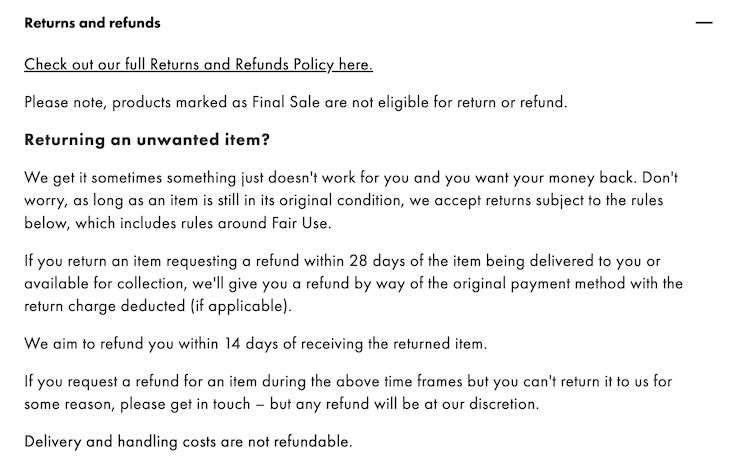
If you run an ecommerce website or app, put a returns and refunds clause in your terms and conditions so customers can always easily find this information.
Here you can provide a link to your official return policy along with a summary of your practices.
Below, see another example clause from ASOS.
What Goes Into The Privacy Policy Clause?
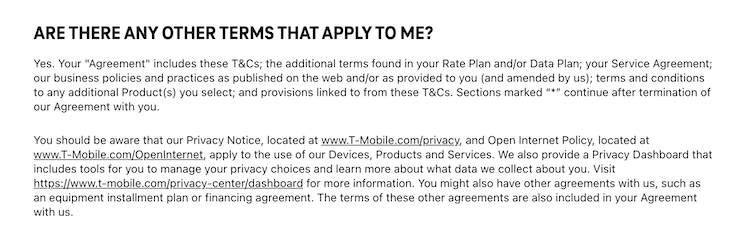
It’s a business best practice to add a privacy policy clause in your terms and conditions agreement and include a live link to the official policy to helps ensure your users can always locate this vital legal document.
See how T-Mobile phrased this clause in their terms and conditions in the screenshot below.
Keep in mind that there are additional guidelines you need to follow with your privacy policy because different data privacy regulations around the globe dictate the specifics.
What Goes Into The Limitation Of Liabilities?
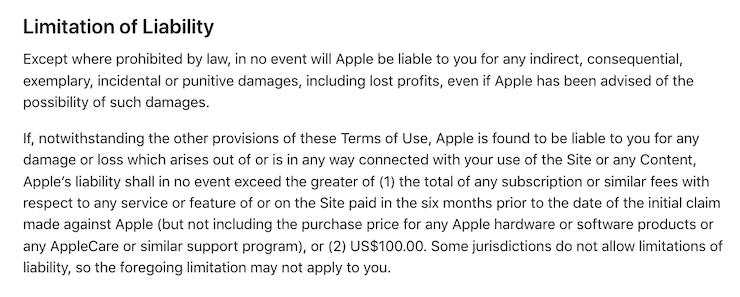
It’s important to have a limitations of liability clause in your terms and conditions agreement, also called a no responsibility clause.
Businesses use this clause to limit what customers can hold them accountable for, and it usually features standard language, as shown in the example below from Apple.
What Goes Into The Governing And Applicable Laws Clause?
In your terms and conditions agreement, you can establish within a clause what national or state law governs the contract between you and the users.
Most companies choose the law of their state or country or the country where users access their site or app.
See an example of this terms and conditions clause from Spotify below.

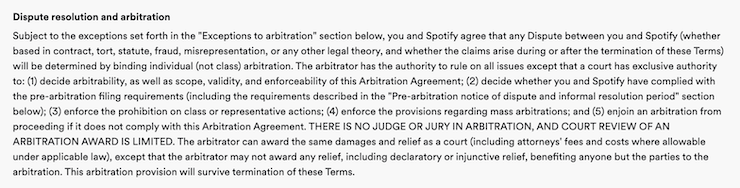
What Goes Into The Dispute Resolutions And Indemnification Clause?
You should establish how you agree to handle consumer disputes within your terms and conditions.
Typically details about who covers costs and how disputes are resolved go in a dispute resolution or indemnification clause.
Below, see another example of this clause from Spotify.
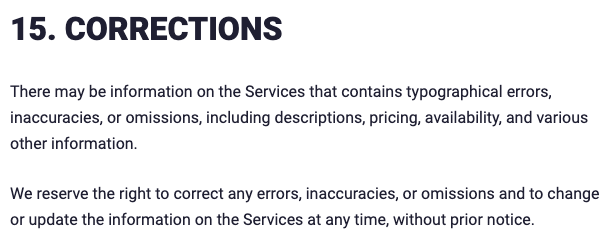
What Goes Into The Corrections And Inaccuracies Clause?
Within your terms and conditions agreement, include a clause that reminds users that you’re not liable for mistakes or errors on your site.
This section covers your back just in case there are any inconsistencies in your content, allowing you to update it with the correct information at any time.
Below, see a great example from our own terms and conditions agreement.
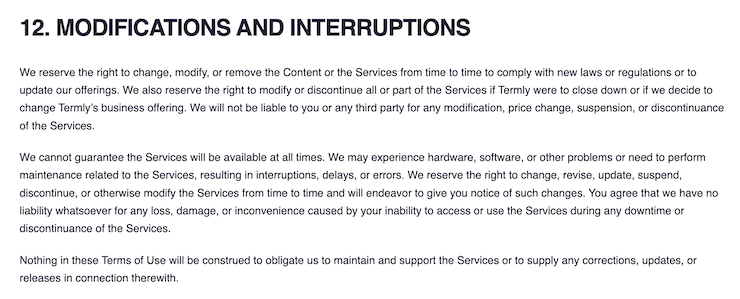
What Goes Into The Modifications and Interruptions Clause?
You should add a modifications and interruptions clause to your terms to limit your liabilities if users claim any loss or damage because they can’t use your site.
Here you can explain your right to change or delete anything on your site and states that users may encounter hardware problems and downtime.
Here’s another example from our own terms and conditions of how to phrase this section.
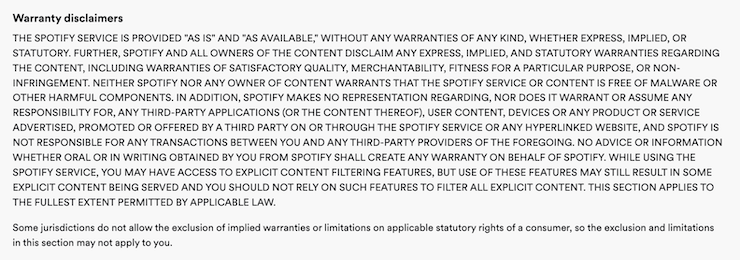
What Goes Into The Disclaimers And Warranties Clause?
Include a disclaimer and warranties clause in your terms and conditions to let users know that your site is available on an “as-is and as-available basis” and to use it at their own risk.
Essentially, this clause states that you are not responsible for any damage your service, product, or website may cause a user.
Below, see an example of a disclaimer warranty from Spotify.
What Goes Into The Contact Information Clause?
Finally, you need to inform readers how they can reach you if they have any questions or concerns about your service and policies, so put those details in a clause at the end of your terms and conditions agreement.
This might include info like a working email address, a mailing address, a phone number, or an online contact form.
Below, see an example of this clause from Etsy, who keeps it short and sweet.

Where Should You Post Your Terms and Conditions?
Once you’ve created a terms and conditions agreement, you need to display it in prominent areas of your website or app, for example:
- Website or App Footer: The most common place to link your terms and conditions agreement is in the footer of your website or mobile app because these are static areas that do not change no matter where your users end up. This is also where visitors typically expect to see a link to your site’s terms and conditions.
- New User Account Creation Pages: Another great place to link to your terms and conditions agreement is during the sign-up or new user account creation process, as it gives people a chance to read your policy before joining your platform.
- Payment Screens: You should link your terms and conditions to payment screens or checkout pages to set proper customer expectations and give them a chance to see and read the policy. This may help shield you from legal and financial risk, particularly if your terms and conditions have detailed pricing disclosures and site support clauses.
- Privacy Center: There are lots of legal documents and web policies you need your users to be able to find, read, and easily understand, so house them all in one place on your website.
- Inside Current Legal Policies: It’s a business best practice to also link to your terms and conditions in other legal documents on your site, such as your end-user license agreement (EULA) or privacy policy. Linking internally makes it easier for users to access all information and understand what they agree to.
How To Make Your Terms and Conditions Agreement Enforceable
To enforce your terms and conditions agreement, you must be able to prove that your users consented to it, read the contents, and fully understood what they agreed to.
In the eyes of the courts, just having a terms and conditions page and placing links throughout your website isn’t enough to get agreement.
You can obtain consent to your agreement by utilizing both the clickwrap and browsewrap methods:
You must also ensure the formatting of your terms and conditions is easy to follow and that it’s written clearly and in a straightforward way. This is why tools like free templates are ideal for businesses to start with.
Courts might also consider additional details, like if the link is easy to find on your platform and the different times it was presented to the user.
Exmaples of Good Website Terms and Conditions
Taking inspiration from other sites’ terms and conditions can help inspire you when making your own, so let’s go over some great example terms and conditions agreements together.
McDonald’s Online Services T&Cs
First, let’s take a look at McDonald’s for a sample of a good terms and conditions agreement.
To keep visitors informed about updates to their terms and conditions agreement, McDonalds puts the information in a pop-up banner that appears when you arrive on their webpage, as shown in the screenshot below.

It is to read the clauses, which are written in a simple, straightforward way matching the brand, as shown in the screenshot below.
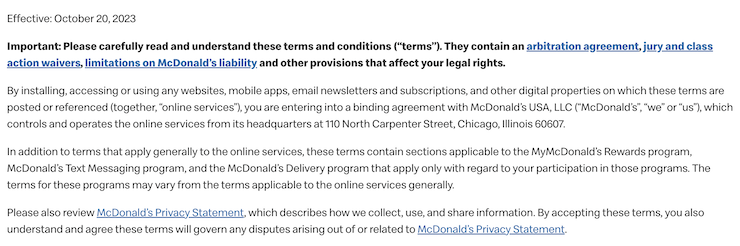
Throughout their policy, they bold parts of the content they want users to pay closer attention to. This us something you can consider doing in your own agreement.
See an example of this formatting in the screenshot below of their acceptable and prohibited uses clause for their online services.

AT&T T&Cs
Another strong terms and conditions example comes from one of the world’s largest telecommunications companies, AT&T.
AT&T’s terms and conditions are incredibly detailed and comprehensive.
As shown below, the company uses a clickable table of contents to make their terms easier to navigate through.
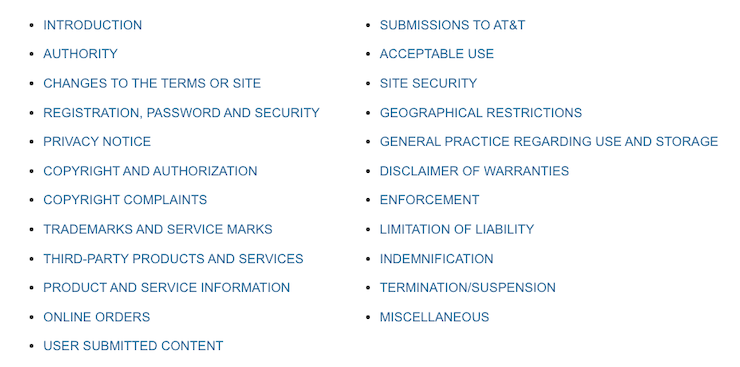
Consider doing the same if you have lengthy terms and conditions.
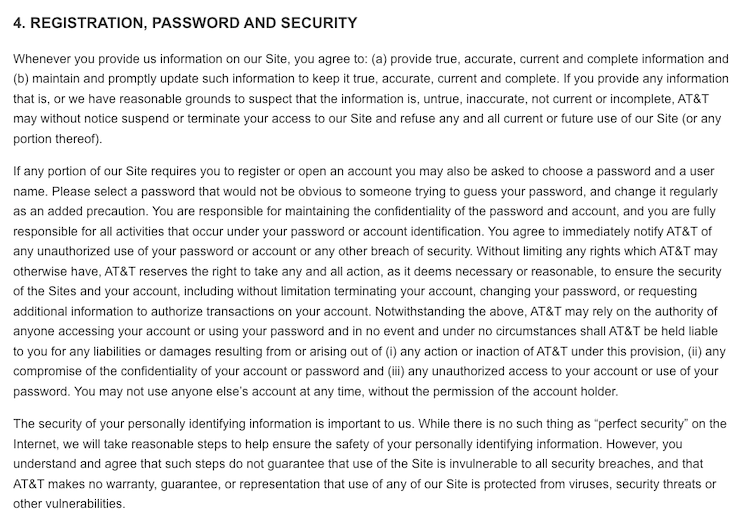
In their agreement, they also gives special consideration to passwords and security because it collects a substantial amount of personal data from customers.
At the same time, they limit their liabilities by controlling user expectations, as shown in the screenshot of their security clause below.
Apple T&Cs
Finally, let’s look at Apple’s terms and conditions for our final example, a tech company with a well-crafted agreement.
Apple’s terms clearly define what is considered an acceptable use of their services and what is not, as shown in the screenshot below.
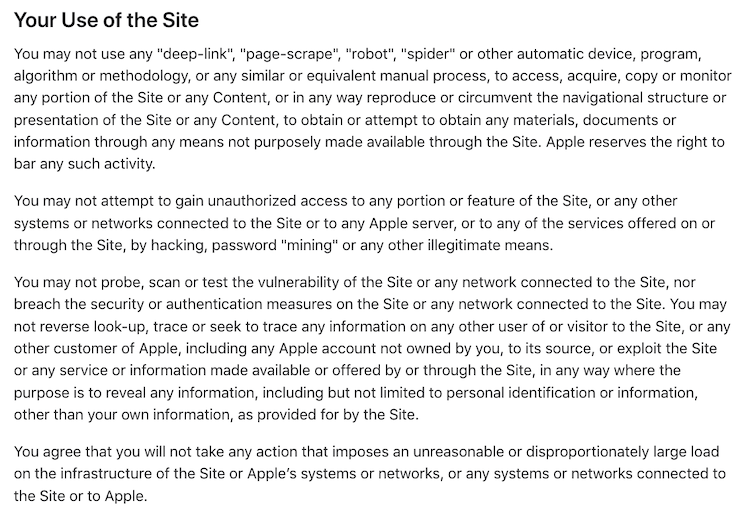
Apple also provides links to additional policies relevant to their consumers directly within their terms and conditions, shown below.
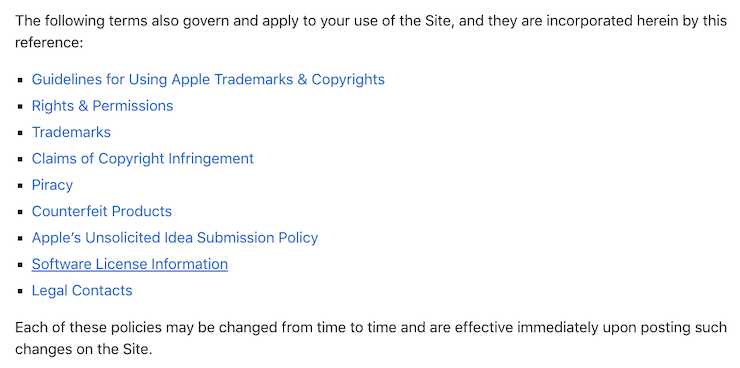
You can do the same thing as Apple and put links to your privacy policy, shipping policy, and return and refund policies within clauses in your terms.
Other Ways To Make a Terms and Conditions Agreement
Now that you know how to use a template to make a terms and conditions, let’s discuss two other ways to make this agreement for your site.
Use a Terms and Conditions Generator
You saw that giant list of clauses! Making a terms and conditions agreement can take up a lot of time and effort.
Using a managed solution, like our Terms and Conditions Generator, is the simplest, quickest way to make one of these agreements for your platform.
Our Terms and Conditions Generator does all the hard work for you. You only need to answer a few simple questions about your business, as shown in the screenshot below.
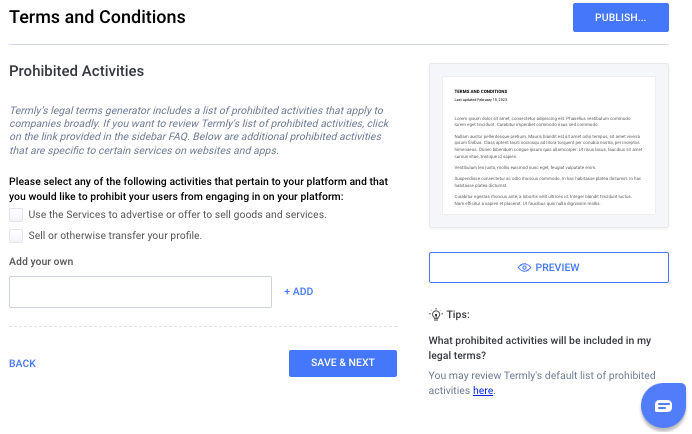
Backed by our legal team, they even included useful Tips and answers to frequently asked questions in the policy builder to help ensure you’re answering the questions accurately.
You can also go back in and update your policy as needed, so it can grow and evolve right alongside your business.
Write One Yourslef
You can take a do-it-yourself approach and write a terms and conditions agreement on your own, which is a good approach if you have a legal team or run a unique business that requires non-traditional clauses.
But the cons of writing it yourself are hard to ignore — these agreements are challenging to make, and it’s easy to miss vital clauses.
For some help, check out our guide on how to write terms and conditions.
How To Make A Good Terms and Conditions Agreement?
Because making a terms and conditions agreement can be tricky, here are some tips on how to write a good one:
- Use clear language: You want all of your users to be able to read and understand your terms and conditions, so use clear, straightforward language and avoid complicated jargon or unnecessary legalese. This makes life easier for your visitors and strengthens your defense if users take legal action against you.
- Use your brand’s voice: Your terms and conditions are part of your brand, so use the same style, sentence length, and tone as other pages on your site. This can help you build and maintain brand awareness and cohesion. It also will make it clear to users that the agreement was written by and belongs to your company.
- Seek legal advice from an attorney if necessary: Depending on your target audience, consider getting legal advice from an attorney when working on complex clauses of your terms and conditions. This is worthwhile for websites and apps that sell to minors, as there are specific requirements you must follow. For example, you must put a “Children” or “Youth” section outlining how legal guardians can consent on behalf of the minor before letting their child use your site.
- Don’t copy terms and conditions text from another website: This is plagiarism, as these documents and other website policies are protected under copyright laws. Plus, another person’s terms and conditions most likely won’t fit your site’s needs, leaving you with inadequate protection.
Terms and Conditions FAQs
Check out some frequently asked questions about terms and conditions below.
Is a terms and conditions agreement legally required?
No, a terms and conditions agreement is not legally required, but it’s a business best practice to have one in place, as it helps:
- Limit your liabilities
- Protect your site from abusive users
- Establish your intellectual property rights
- Set proper customer expectations
Are terms and conditions legally binding?
Terms and conditions agreements can be legally binding if you prove your users read and consented to the document.
But it may be circumstantial and other factors will also be considered.
What are the benefits of having a Terms and Conditions agreement?
There are several benefits of having a terms and conditions agreement, here are just a few:
- Your terms allow you to dictate and control how your website or app gets used
- You can disclaim warranties and limit your liabilities
- They outline your dispute resolutions and governing laws
- It can help set clear customer expectations
- They prevent you from answering the same customer questions over and over again
What clauses should be in my Terms and Conditions agreement?
The clauses you should put in your terms and conditions depend on the industry you’re in and how you allow users to access your website or mobile app, but here is a list of the most common clauses:
- Introduction clause
- Intellectual property clause
- User contribution clause
- Third parties clause
- User registration clause
- Acceptable uses clause
- Prohibited activities and restrictions clause
- Suspension and termination clause
- Site management and support clause
- Pricing and payment terms clause
- Shipping policy clause
- Returns and refund policy clause
- Privacy policy clause
- Limitation of Liabilities
- Governing and applicable laws clause
- Dispute resolutions and indemnification clause
- Corrections and inaccuracies clause
- Disclaimers and warranties clause
- Contact information clause
Where do I display my Terms and Conditions agreement?
Your terms and conditions should be readily accessible, so display them in the following places:
- Your website or app footer or other static menus
- On any payment screens
- On any new user account creation pages
- In your privacy center
How do I make my Terms and Conditions enforceable?
To help make your terms and conditions agreement enforceable, implement all of the following:
- Ensure all of your users read and actively agree to your terms
- Use both clickwrap consent and browsewrap consent methods
- Make your terms very easy to read and understand
- Link them in multiple easy-to-find locations throughout your platform
- Include all of the relevant disclosures as required by the appropriate laws
Are “terms and conditions” and “terms of use” the same?
Yes, terms and conditions, terms of use, and terms of service refer to the same agreement.
Conclusion & Additional Resources
If your business runs a website or mobile app, it’s in your best interest to have a terms and conditions agreement to set proper customer expectations and limit your exposure to unnecessary legal or financial risks.
A comprehensive terms and conditions agreement will give you control over:
- How your site gets used
- Who gets to use your platform
- How you manage your site or service
- What constitutes acceptable and unacceptable user behavior
- Your intellectual property
After you’ve finished your terms and conditions, put it in prominent places throughout your website, like the footer and payment screens, so your users can always access it.
Or, if you’re looking for a different type of terms and conditions template, check out our other options to find what you need:
| Terms and Conditions Template | Description |
| Mobile App Terms and Conditions Template | Terms and conditions for apps in various app stores |
| E-commerce Terms and Conditions Template | Terms for e-commerce sites and online shops |
| Terms of Service Template | For those who prefer terms of service |
| Terms of Use Template | For those who prefer terms of use |

Written by Natasha Piirainen
Natasha Piirainen is a privacy writer with a Bachelor’s Degree in English and Philosophy from Wheaton College and over 10 years of professional experience in research-driven content development.
Read all posts by Natasha Piirainen
Reviewed by Masha Komnenic CIPP/E, CIPM, CIPT, FIP
Masha Komnenic is a legal counsel and Termly’s Director of Global Privacy, who received her law degree from Belgrade University. She specializes in implementing, monitoring, and auditing business compliance with privacy regulations (HIPAA, PIPEDA, ePrivacy Directive, GDPR, CCPA, POPIA, LGPD).
Read all posts reviewed by Masha Komnenic CIPP/E, CIPM, CIPT, FIP