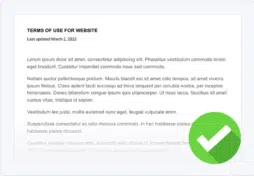


A terms of service template is a free tool that helps businesses easily create one of these agreements for your website.
Terms of service agreements set the rules and guidelines for your users, prohibit or restrict certain behaviors and activities, limit your liabilities, and establish your property rights.
Below, discover how to use our free terms of service template, and learn all about what one is, why you need one, and what should go into it.
- How To Use Our Terms of Service Template
- Terms of Service Template Example Text and Download
- Why Should You Use a Terms of Service Template?
- What Is a Terms of Service Agreement?
- Do You Need a Terms of Service for Your Website or App?
- What Goes Into a Terms of Service Agreement?
- Where Should You Display Your Terms of Service Agreement?
- How Can You Make Your Terms of Service Agreement Enforceable?
- Good Terms of Service Examples
- Tips for a Having a Good Terms of Service
- Terms of Service FAQ
- Conclusion
How To Use Our Terms of Service Template
To use Termly’s free terms of service template, follow these easy steps:
- Choose how you want to download our free terms of service template, as a WordDoc, PDF, Google Doc, or HTML snippet,
- Read through the template and remove any clauses that do not apply to your business,
- Fill in the blank section and [brackets] with accurate information about your website, app, or platform,
- Customize or add any additional language as needed,
- That’s all it takes!
Terms of Service Template Example Text and Download
You can download our free terms of service template below:
Additional Template Download Options
You can use our standard terms of service template for platforms including:
- Websites
- Mobile Apps
- Software as a Service (SaaS)
- Blogs
- Online Stores
- Dropshipping businesses
- Marketplace shops
- Retail stores
- Ecommerce websites or apps
- Forums
- Subscription-based platforms
- And more!
Why Should You Use a Terms of Service Template?
Making your own terms of service agreement can be a daunting process. A terms of service template is a great resource for business owners like you because it completes some of the initial leg work for you.
Rather than starting entirely from scratch, templates like ours outline common clauses and provide you with part of the actual text for each section.
Our terms of service template is very thorough, which can help prevent you from leaving out important items. But it’s also designed to be easy to read, which is ideal for your users.
Terms of Service Template vs Generator
Sometimes, it makes more sense to use an automatic Terms of Service Generator instead of a template. For example:
| Using a Generator Makes Sense When You: | Using a Template Makes Sense When You: |
|---|---|
|
|
What Is a Terms of Service Agreement?
A terms of service sets all user rules, restrictions, and prohibited behaviors, and outlines your company’s liability limitations, property rights, and dispute resolutions.
There are tons of alternative titles for a terms of service agreement, like:
- Terms of Use
- Terms and Conditions
- ToS Agreement
- General Terms
- Terms
Despite the different names, these agreements all help protect your business from users who might break the law or cause harm to your website, app, or other users.
Do You Need a Terms of Service for Your Website or App?
Yes, you most likely need a terms of servie on your website or app, even though they’re not technically legally required.
Posting one on your website or app can help:
- Set your users’ expectations
- Protect your business from legal liabilities
- Maintain rights over your intellectual property
- Minimizes Disputes
- Establish trust and transparency with your users
Let’s go over each these reasons for having a website or mobile app terms of service agreement in more detail.
How Do Terms of Service Agreements Help Set Users’ Expectations?
One of the purposes of a terms of service policy is to explain the rules and guidelines your users must follow while accessing your services, which helps set their expectations.
By clearly communicating what’s allowed and prohibited on your website or app and explaining to your users the consequences of breaking those rules, you make it easier for your business to prevent users from abusing your services or causing harm to others.
How Do Terms of Service Agreements Limit Your Liabilities?
Establishing what your business is and isn’t liable for in a ToS agreement limits what you can be sued for and may save you thousands in legal fees.
For example, you can include various disclaimers within your terms of service to help protect your website or app from being held liable for things like:
- Loss of profits
- Personal injury
- Warranty issues
- Misrepresented products
- Computer issues
How Do Terms of Service Agreements Help MaintainIntellectual Property Rights?
A terms of service agreement can establish your rights over your property and explain if and how other people can legally use those materials.
As a business owner, you probably have content and branding that you own and use that you don’t want other people to steal, copy, or reproduce.
You might also consider including a copyright disclaimer for any original work of creative expression that you capture in a tangible form.
How Do Terms of Service Agreements Help Minimize Disputes?
Your terms of service agreement can explain how your company will respond to users who break the rules you outline in your policy, which streamlines the process of addressing and resolving legal disputes.
How Do Terms of Service Agreements Help Build User Trust and Transparency?
If you own a website or app, it’s in your best interest to post a general terms of service agreement because people expect to see one, and being honest with them builds a relationship of trust.
If they cannot find your terms of service, they might assume your business is untrustworthy or choose a competitor with more transparent policies.
What Goes Into a Terms of Service Agreement?
The specific clauses in terms of servie agreements can vary from business to business, but here are the most common clauses you might consider adding to your own agreement.
Introduction Clause
Consider putting an introduction clause at the start of your terms of service outlining who and what the agreement applies to.
This clause:
- Introduces your company,
- Defines terms you’ll use throughout the rest of the document, and
- Tells users how they can express consent to the agreement.
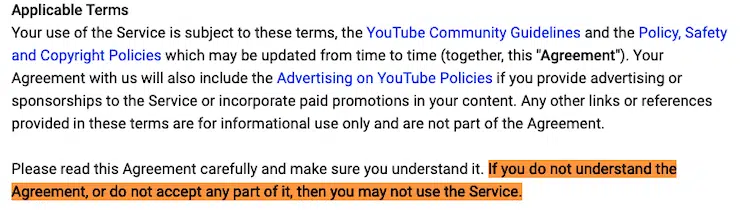
In the screenshot below, see a terms of service sample from YouTube, whose intro clause clearly states that anyone who does not understand or agree to their terms may not use their services.
Prohibited or Acceptable Uses Clause
Your terms of service agreement acts as the rules your users must follow when accessing your services, so list all of those prohibited behaviors and activities in a clause.
This is where you can ban things like:
- Breaking the law
- Violent, crude, or obscene content
- Spreading false or misleading information
- Stalking or harassing other users
- Violating copyright laws
- Tampering or hacking into your website
- Spamming your service or other users
- Scamming your service or other users
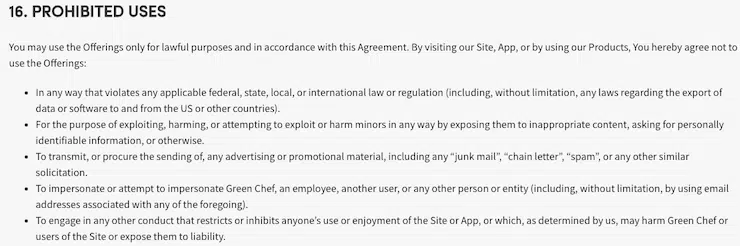
In the screenshot below, find an example terms of service prohibited uses clause from Green Chef, a meal kit delivery service.
Or, if your website/app allows users to interact with one another, create profiles, or post and share content, you might separate this clause into its own acceptable use policy.
While it’s technically still part of your terms, putting the content into its own document makes it easier to share the rules of use that directly impact your consumers.
You can create one in minutes by using our Acceptable Use Policy Generator.
Account Termination and Suspension Clause
The termination clause in your terms of service outlines what process you take when and if a user violates your guidelines, including banning the perpetrator or suspending and removing their account.
Keep this clause broad so you have more leeway for managing unnecessary and rule-breaking accounts.
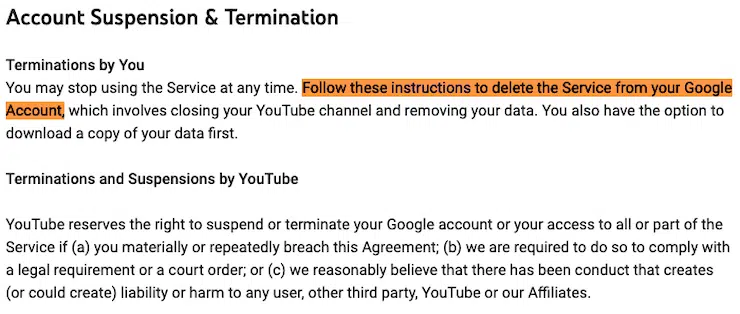
Also include information about how a user can delete their own account, like how YouTube does it in their terms of service policy, shown in the screenshot below.
Property Rights Clause
If you own a business, you probably have intellectual property that you want to protect.
Include a clause in your terms of service that lists all property your business trademarks or other relevant copyright examples, like:
- Designs
- Videos
- Images
- Names
- Logos
- Patents
Inform your users about any restrictions that apply to outside parties who want to use those materials.
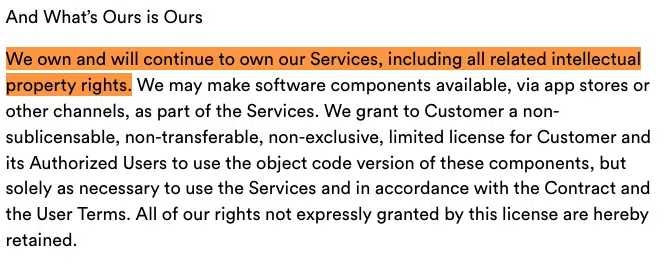
In the screenshot below, see a sample terms of service property rights clause from Slack that is well-written and easy to understand.
Products and Promotional Information Clause
Your product and promotional information clause can help prevent your company from being held liable for any inconsistencies or discrepancies posted on your app or website.
For example,
- You can inform your users that product descriptions, information, and pricing online may not always be up to date and are subject to change without notice.
- You can also stipulate within this clause that your company reserves the right to end or refuse promotions, including discount codes, at any time.
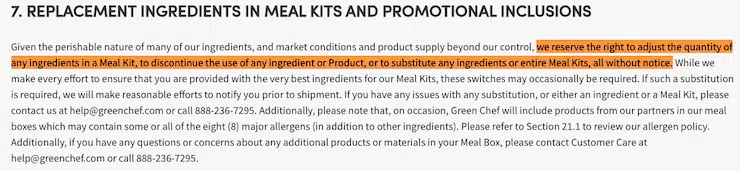
In the screenshot below, see how Green Chef phrases the fact that they reserve the right to adjust or replace meal kit ingredients without notice.
Payments and Pricing Clause
Your terms of service is a great place for you to tell your users about your payment policies.
Try to be as thorough as possible and inform your users about:
- The methods of payments you accept
- What happens if they miss a payment
- The types of currency you take
If you want more tips to help you get the most out of this clause, check out our guide on how to write payment terms.
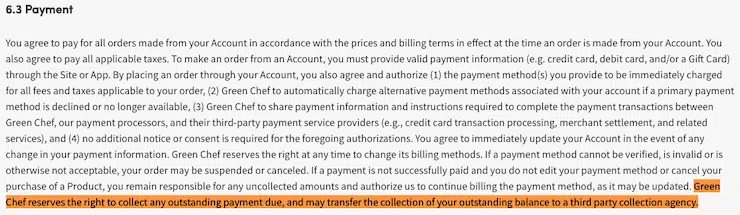
Below, find another sample screenshot from Green Chef of how they respond to missed payments.
User Contributions Clause
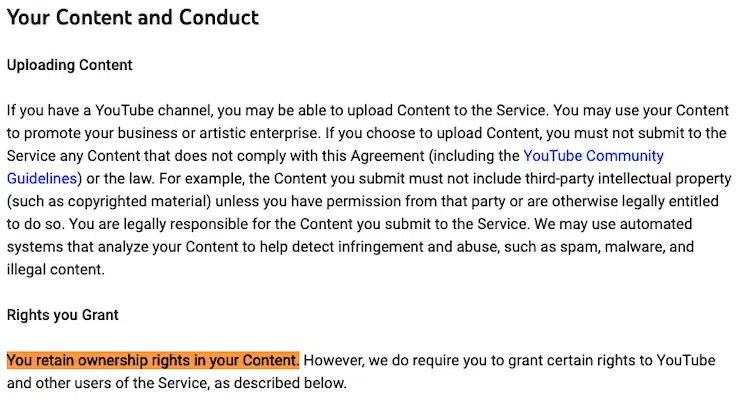
If your website or app allows users to contribute content, you should include a clause within your terms of service so people know what they’re allowed to post and who has the rights to it.
The example terms of service shown below comes from YouTube, and the highlighted text explains what rights their users retain over the content they upload to the video-sharing platform.
Limitation of Liability Clause
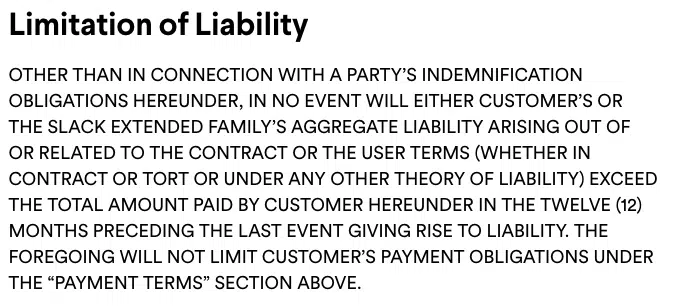
If anything ever happens on your website or app, including a liability disclaimer in your terms of service may help remove some responsibilities from your business.
This is a statement from your business denying responsibility for any damages your users might suffer from accessing your services. It may also tell users what they cannot sue you for.
In the example below, read how Slack communicates their liability limitations in their terms of service.
Privacy Agreements Clause
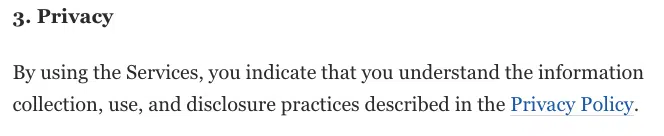
You should link to other policies and legal agreements you want your users to access within your terms of service, including your privacy policy.
In the example below, notice how the Washington Post directly embeds a link to their privacy policy in their short, succinct privacy clause.
But if your business falls under the jurisdiction of data privacy laws like the General Data Protection Regulation (GDPR) or the California Consumer Privacy Act (CCPA), you must meet additional legal requirements, so make sure you’re familiar with the regulations that apply to your business.
Third-party Links Clause
If you link to any external sources on your website or app, you can use a third-party links clause to express that your company is not liable for the content that might appear on those pages.
The highlighted text in the screenshot below from YouTube’s terms of service is a great example of how you might phrase your third-party links clause.

Amendments and Changes to the Agreement Clause
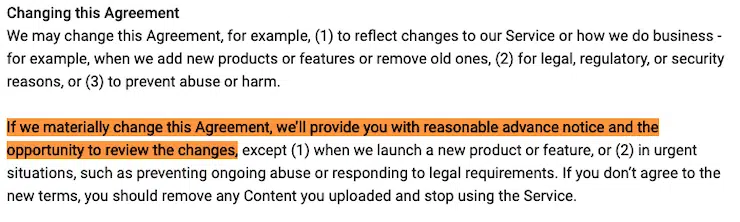
A terms of service agreement is supposed to be a flexible document that adapts with your business, so establish a process for how you will update your users about changes made to your policy.
Many companies include the last updated date near the header of their terms of service, and you should too.
You can also include a short clause setting your users’ expectations, like how YouTube does it in the screenshot below.
Governing Law or Dispute Resolution Clause
A governing law or dispute resolution clause lets users know how your service plans to handle conflicts or controversies relating to your terms of service.
If you choose to settle disputes in court, outline which courts will handle the case, the location of the court, and any governing laws that apply.
For binding arbitration, a mediator settles the dispute. Say where the arbitration will take place, how fees are handled, what the general process will look like, and what laws may apply.
If you choose informal negotiations, mention the timeline for the talks and outline what the process will look like.
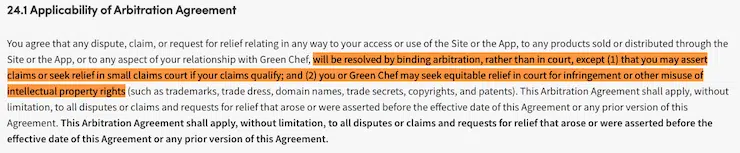
The example clause in the screenshot below from Green Chef shows how they primarily use binding arbitration but also list some exceptions.
Links to Your Other Policies Clause
You should also include links to other relevant customer service policies in this clause if your business primarily sells goods that you ship to users.
For example, if your business uses any of the following policies, link to them in your ToS:
- Return and refund policy
- Shipping policy
- All sales final policy
- No refunds policy
- Money back guarantee
Company Contact Information Clause
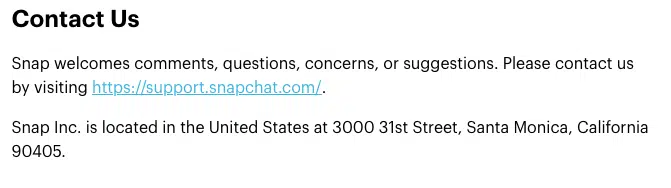
Include accurate contact information at the end of your terms of service agreement so users know how to reach you if they have questions, comments, or concerns.
The example screenshot below shows the company contact clause in the terms of service from Snapchat.
Where Should You Display Your Terms of Service Agreement?
You should post your terms of service agreement in multiple spots throughout your website or app, including your:
- Website footer
- Payment screens
- New user sign-up pages
- Privacy center
Why Put Your Terms of Service Agreement in Your Website Footer?
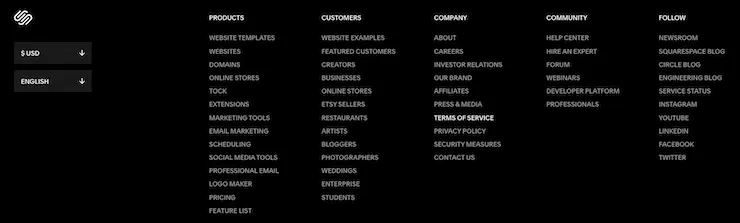
The most common place to link to your terms of service is the footer of your website because it ensures your users always have access to the policy, no matter what part of your site they end up on.
For example, the screenshot below shows the footer from Squarespace’s website, which clearly links to their terms of service under the ‘Company’ section.
Why Should You Link ToS Agreements on Payment Screens?
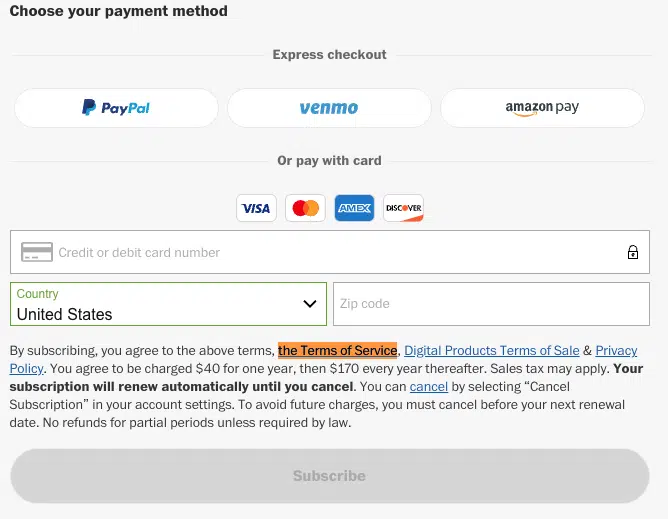
You should add your terms of service link to payment screens because it gives new and returning customers a chance to read the guidelines they’re expected to follow if they choose to make a purchase.
In the screenshot below, you can find an example of how the Washington Post puts a link to their terms of service on their payment page for a new subscription.
Why Add a Terms of Service to Account Creation or New Profile Pages?
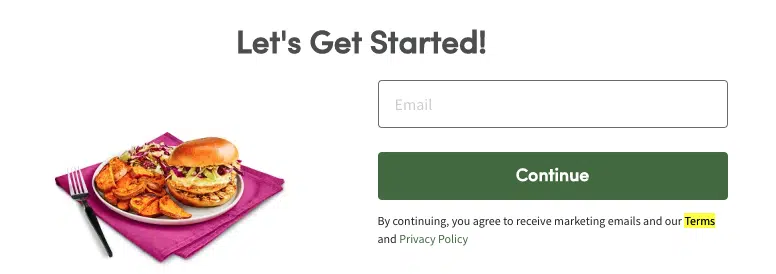
If your website or app allows users to create a profile or account, consider putting a link to your terms of service on a new user page so they can read and understand your rules before joining your service.
For example, the highlighted text in the screenshot shown below from Green Chef’s new user profile signup page links directly to their terms of service.
Why Link to a ToS in Your Privacy Center?
It makes sense to link your terms of service to your privacy center because it acts as a central hub where you can host links to all of your important legal agreements, privacy documents, policies, and procedures you want your users to access.
Users also expect to find your terms of service there, since that’s where all other policies live.
For more information, check out our article covering all you need to know about privacy centers for tips on making your own.
How Can You Make Your Terms of Service Agreement Enforceable?
To up the chances that your ToS agreement will be considered enforceable, you need to prove you got consent from your users, and that they read and agreed to your terms.
Some methods for obtaining consent from consumers include the clickwrap and browsewrap methods of consent.
What is the Clickwrap Method of Consent?
The clickwrap method for consent is a method of obtaining consent for your terms of service agreement by asking users to take an action to denote agreement, like:
- Selecting a checkbox to show that they’ve read and agree to the policy,
- Clicking the ‘I Agree’ button to for a policy,
- Digitally or physically signing their name to a document.
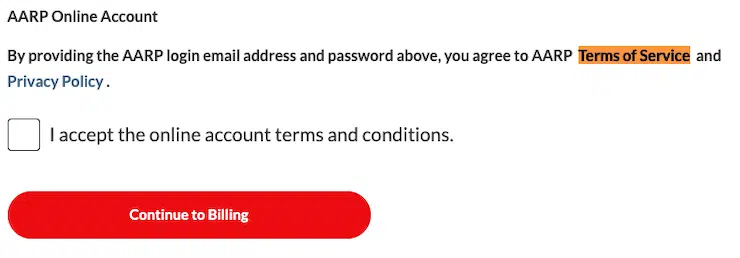
Asking your users to select a check box expressing they’ve read and accepted your terms of service may help ensure your ToS policy is enforceable and is more likely to be upheld in court.
For example, the highlighted text in the screenshot below shows how AARP uses the clickwrap method for consent to their terms of service whenever a new user signs up as a member.
What is Implied Consent or the Browsewrap Method?
Another common way to enforce your terms of service is to use implied consent or browsewrap, which means your users agree to your terms by taking an implied action, like:
- Using your website,
- Signing up for a profile,
- Browsing pages on an app.
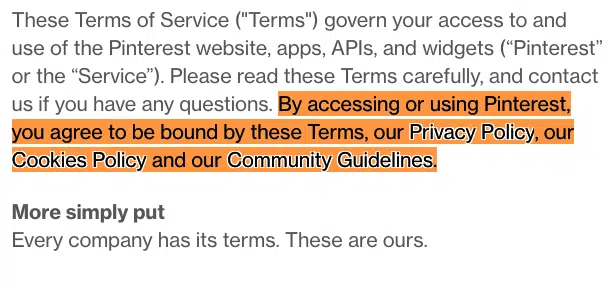
While implied consent works fine for most users, it can be tricky to hold up in court because your users can claim they did not know they agreed to anything by using your website or app.
We recommend using both clickwrap and browsewrap methods for your terms of service agreement to best protect your business.
You can find an example of browsewrap consent in the highlighted text in the screenshot below from Pinterest’s terms of service.
Good Terms of Service Examples
Let’s look at some examples of good real-world terms of services to help you make your own ToS agreement.
Pinterest’s Terms of Service
First, let’s look at Pinterest’s terms of service agreement, as shown in the screenshot below.
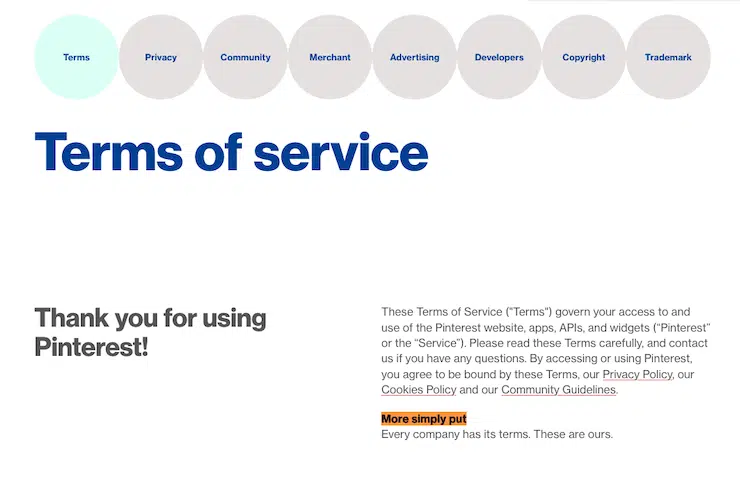
This is a good example because it includes links to other relevant policies at the top of their document formatted as eye-catching circles.
It also features helpful ‘More simply put’ summaries at the end of most clauses.
Your terms of service should also be written and formatted in a way that’s easy for your users to read and understand.
In the next screenshot, read how Pinterest simplifies their warranty clause for their users, which is a nice touch since this clause usually contains a lot of legalese.
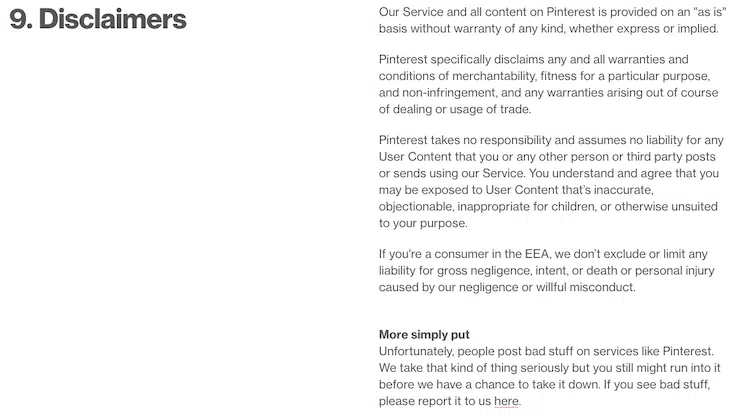
We like how Pinterest consistently embeds relevant links for users throughout their entire policy and recommend you do the same in your own ToS agreement.
Slack’s Terms of Service
Next let’s look at an example in the sceenshot below from Slack’s terms of service page, which has links to a second ToS policy, one is for their customers and the other is for users who were invited into a workspace.
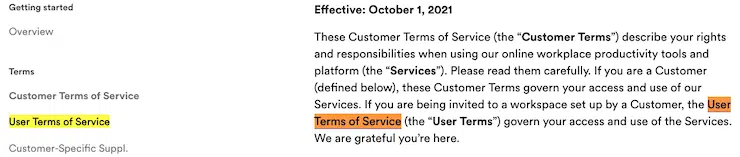
Your business might also require a more complex terms of service agreement with clauses and amendments that you can separate into independently shareable documents.
Slack is a great example of a company that separates their acceptable use clause into its own document, which they very clearly describe in the highlighted text shown in the screenshot below.
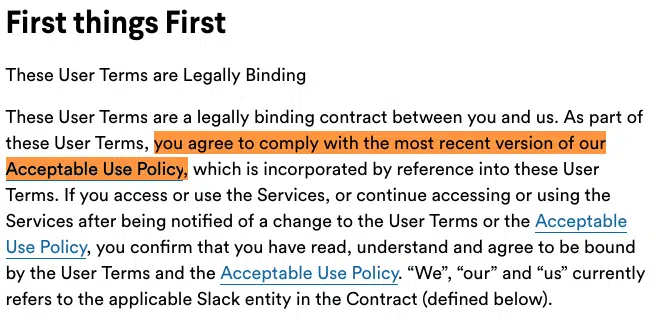
Like Slack, you can customize and format your terms of service agreement in whatever way you require so that it meets the unique needs of your business.
Tips for a Having a Good Terms of Service
Let’s go over a few easy tips you can follow to make a high-quality terms of service agreement for your website or app.
- Make Your Terms of Service Easy to Read: Your terms of service is a legally binding contract, so you want to ensure it’s written in a way most users can understand. In clauses where you can’t avoid legalese, like your limit of liability clause, consider simplifying the information using a brief summary, like the Pinterest examples above.
- Include Clauses Relevant to Your Business: Terms of service agreements vary drastically depending on the type of business you do. Pick and choose the clauses most relevant to your company, and be sure you’re extra thorough so you don’t accidentally leave something out.
- Don’t Plagiarize Someone Else’s Terms of Service: No matter what you do, don’t copy and paste someone else’s terms or service agreement. Not only is this plagiarism, but legal documents are copyrighted materials. Remember, the details within ToS policies change drastically from one company to the next, so if you do copy someone else’s agreement, it won’t cover all rules and guidelines that your business requires.
Terms of Service FAQ
Here are some answers to a few frequently asked questions about terms of service agreements.
What is a terms of service agreement?
A terms of service agreement outlines all rules of use your customers must follow when using your services, helps limit liabilities from falling onto your company, and establishes your property rights.
Do I need a terms of service for my website?
Yes, you should have a terms of service for your website to help set customer rules and expectations, resolve conflicts, establish property rights, and take some legal liabilities off your business.
Do I need a terms of service for my app?
Yes, you should have a terms of service for your app to help establish the rules and expectations for your customers, claim your property rights, resolve potential conflicts, and limit the legal liabilities that fall onto your business.
What clauses should every terms of service include?
Your terms of service should include some or all of the following clauses, but you can also adapt the agreement to fit whatever your business requires:
- Introduction
- Prohibited or acceptable uses
- Account Termination and Suspension
- Property Rights
- Products and Promotional Information
- Payments and Pricing
- User Contributions
- Limitation of Liability
- Privacy Agreements
- Third-party Links
- Amendments and Changes to the Agreement
- Governing Law or Dispute Resolution
- Company Contact Information
Conclusion
If you own a website or app, you should post a terms of service in multiple locations so your users are always aware of the guidelines they’re expected to follow when using your services.
A standard terms of service agreement also helps limit liabilities from falling onto your business and allows you to establish and maintain your intellectual property rights.
If you don’t already have a ToS agreement on your website or app, there’s no need to wait. Download our free terms of service template and customize it to fit your unique business needs.

Written by Natasha Piirainen
Natasha Piirainen is a privacy writer with a Bachelor’s Degree in English and Philosophy from Wheaton College and over 10 years of professional experience in research-driven content development.
Read all posts by Natasha Piirainen
Reviewed by Masha Komnenic CIPP/E, CIPM, CIPT, FIP
Masha Komnenic is a legal counsel and Termly’s Director of Global Privacy, who received her law degree from Belgrade University. She specializes in implementing, monitoring, and auditing business compliance with privacy regulations (HIPAA, PIPEDA, ePrivacy Directive, GDPR, CCPA, POPIA, LGPD).
Read all posts reviewed by Masha Komnenic CIPP/E, CIPM, CIPT, FIP